DeBox Shares Protocol
DeBox Shares: Permissionless Automatic Revenue Sharing, Effective Once Configured
🎉 The DeBox Shares V2 protocol is now live!
⚡ If you have previously integrated Shares V1, no code changes are required!
Automatically upgrade to V2, enjoying higher commissions, enhanced features, and a better experience!
🚀 Start integrating the DeBox Shares protocol now and unlock a new revenue model!
DeBox Shares Introduction
1. What is DeBox Shares?
-
DeBox Shares is an underlying revenue-sharing protocol uniquely developed based on the DeBox product, connecting project parties with DeBox groups.
-
It operates through DeBox's product and social relationships.
-
Project parties can integrate without permission—simple and fast, completing the process in just 10 minutes.
-
Groups and inviters can receive instant rebates of up to 80% from project parties. Based on the DeBox Shares protocol and DeBox group functionalities, everyone can open a decentralized exchange after universal on-chain assetization.
-
The DeBox Shares protocol is a permissionless and decentralized protocol. The DeBox platform does not and will not endorse any projects integrated with DeBox Shares.
2. What are the benefits for project owners activating DeBox Shares?
- Through DeBox Shares, projects can reach 10 million real users and 300,000 private community groups. Promoting a project in any group can gain recognition and support from group owners.
What participation methods does Shares support?
- DApp on-chain payment revenue sharing: A DApp calls the DeBox-Shares contract to distribute revenue during a native-token or ERC20-token payment.
- DeBox native Swap group-channel revenue sharing: A developer can add
refGidto a Swap modal Deep Link to attribute an eligible transaction to a DeBox group channel. Eligible group-channel revenue belongs to that group's owner. A Swap modal Deep Link cannot create, change, or override a user's existing invitation relationship; invitation-related revenue follows that relationship and the current platform rules. See DeBox App Deep Links for the link format and parameters.
DApp on-chain payment revenue sharing currently supports Ethereum, Arbitrum, Base, BSC, Optimism, and Polygon assets. The chains supported by the Swap modal and its revenue-sharing channel attribution depend on the current DeBox client and platform rules.
How to integrate Shares?
1. Payment Integration with Shares
- The DeBox Shares protocol is an automated revenue-sharing tool designed for project teams to simplify transaction distribution.
- Developers only need to set the distribution amount. There is no need to handle complex logic involving sharers or invitation codes; the DeBox Shares protocol automatically distributes the revenue from each transaction.
- The integration has two main steps: connect the wallet and request authorization, then call the payment method to complete the payment. Payment details can be viewed after the payment is complete.
1.1 Connect Wallet and Request Authorization
- Use
window.deboxWalletto access blockchain capabilities, including user information. See Web3 interactions.
await window.deboxWallet.request({
    "method": "wallet_requestPermissions",
    "params": [{
        eth_accounts: {
            "debox_getUserInfo": {}
        }
    }],
});
await window.deboxWallet.request({
    "method": "debox_getUserInfo",
    "params": [],
});
2. On-Chain Payment Integration with Shares
On-chain payment is a real-time shares distribution method. When users make payments using tokens, a portion of the payment amount is automatically donated to the DeBox Shares protocol for shares distribution, completing the revenue sharing process.
Developers only need to make small adjustments to the DApp payment logic to implement highly customized on-chain payment revenue sharing.
2.1 On-Chain Payment Shares Process
There are two types of on-chain payment shares: native token (ETH) payment shares and ERC20 token payment shares:
2.1.1 Native Token (ETH) Payment Shares
The native token (ETH) payment shares involves two steps: calculating the shares amount and calling the contract's donation function to trigger subsequent processing.
-
Calculate the Shares Amount
- The Dapp calculates the shares amount to be distributed through the DeBox Shares protocol based on the business design.
-
Call the
donationToSharesMethod with the Shares Amount to Trigger Subsequent Logic:// ...
uint256 donatedAmountETH = amountAcquiredETH / 10; // Calculate the shares amount
doxShares.donationToShares{ value: donatedAmountETH }(); // Trigger subsequent shares logic
// ... -
Example Contract Logic
-
Example of a Dapp contract integrating the Shares protocol:
// SPDX-License-Identifier: Apache License 2.0
pragma solidity ^0.8.22;

import { IERC20 } from "@openzeppelin/contracts/token/ERC20/IERC20.sol";
import { IDeBoxShares } from "@debox/deboxdapp/interfaces/facets/IShares.sol";
import { SafeERC20 } from "@openzeppelin/contracts/token/ERC20/utils/SafeERC20.sol";

contract PlayGameWithShares {
    IDeBoxShares public doxShares;
    event GamePlayed(address player, IERC20 token, uint256 amount);
    constructor(IDeBoxShares _doxShares) {
        doxShares = _doxShares;
    }

    // ETH payment function integrated with the Shares protocol in the Dapp
    function playGameWithETH() external payable {
        uint256 amount = msg.value;
        uint256 donatedAmount = amount / 10;
        if (donatedAmount > 0) {
            doxShares.donationToShares{ value: donatedAmount }();
        }
        emit GamePlayed(msg.sender, IERC20(address(0)), amount);
    }
}
2.1.2 ERC20 Token Payment Shares
The ERC20 token payment shares involves two steps: calculating the shares amount and authorizing the DeBox Shares contract, and calling the contract's donation function to trigger subsequent processing.
-
Calculate the Shares Amount and Authorize the DeBox Shares Contract
- First, the Dapp transfers the user's payment tokens to the Dapp contract and calculates the shares amount to be distributed through the DeBox Shares protocol based on the business design.
- Then, the contract calls the
safeIncreaseAllowancemethod to authorize the DeBox Shares contract address to use the shares amount.
// ...
SafeERC20.safeTransferFrom(token, msg.sender, address(this), amount); // Transfer the user's payment tokens to the Dapp contract
uint256 donatedAmount = amountAcquired / 10; // Calculate the shares amount to be distributed through the DeBox Shares protocol
SafeERC20.safeIncreaseAllowance(token, address(doxShares), donatedAmount); // Authorize the DeBox Shares contract to use the shares amount
doxShares.donationToShares(token, donatedAmount); // Trigger subsequent shares logic
// ... -
Example Contract Logic
-
Example of a Dapp contract integrating the Shares protocol:
// SPDX-License-Identifier: Apache License 2.0
pragma solidity ^0.8.22;

import { IERC20 } from "@openzeppelin/contracts/token/ERC20/IERC20.sol";
import { IDeBoxShares } from "@debox/deboxdapp/interfaces/facets/IShares.sol";
import { SafeERC20 } from "@openzeppelin/contracts/token/ERC20/utils/SafeERC20.sol";

contract PlayGameWithShares {
    IDeBoxShares public doxShares;
    event GamePlayed(address player, IERC20 token, uint256 amount);
    constructor(IDeBoxShares _doxShares) {
        doxShares = _doxShares;
    }

    // ERC20 token payment function integrated with the Shares protocol in the Dapp
    function playGame(IERC20 token, uint256 amount) external {
        SafeERC20.safeTransferFrom(token, msg.sender, address(this), amount);

        uint256 donatedAmount = amount / 10;
        if (donatedAmount > 0) {
            SafeERC20.safeIncreaseAllowance(token, address(doxShares), donatedAmount);
            doxShares.donationToShares(address(token), donatedAmount);
        }
        emit GamePlayed(msg.sender, token, amount);
    }
2.2 Shares Contract Interface:
-
DeBox-Shares contract interface:
// SPDX-License-Identifier: Apache License 2.0
pragma solidity ^0.8.22;

interface IDeBoxShares {
    event DonationToShares(address indexed contributor, address indexed token, uint256 amount);
    event SharesConfigSet(address vault, address weth);

    /**
     * @notice Donate tokens to the shares protocol.
     * @dev The donated tokens will be transferred to the vault.
     *  before the donation, the caller must approve me to spend the token.
     * @param token The token to donate. must be a valid ERC20 token.
     * @param amount The amount of `token` to donate. must be greater than 0.
     */
    function donationToShares(address token, uint256 amount) external;

    /**
     * @notice Donate Native coin (ETH) to the shares protocol.
     */
    function donationToShares() external payable;
    function getSharesConfig() external view returns (address vault, address weth);
}
2.3 DeBox-Shares Contract Deployment Addresses:
| Network | Contract Address |
|---|---|
| Ethereum | 0x2e6168f9ca3fe204a2110c4613ce18985f3fbf39 |
| Arbitrum One | 0x509Ca4ff42cECAA1FF4988514211b26e72BDa840 |
| Base | 0x2f8Ae1cC4ab784f7b9E07A61F714ecDe18A4A6d2 |
| BSC | 0x32303FFcb9B6564C2b8a373433A043a7f17E4B37 |
| Optimism | 0x18574E5a838B3FE16948653873386DD114ba1D7C |
| Polygon | 0xb8Af0Fa3E38E8Cb95870091b0d4e32CA232b780D |
2.4 Simplified On-Chain Shares Interface
For Dapps without complex business logic, DeBox provides a simplified on-chain shares interface that supports shares distribution during on-chain native token payments and ERC20 token payments.
Supported Methods:
-
payAndShareWithETH: This method is used for shares distribution during ETH payments.
- Contract Method:
/**
* @notice Pay with ETH and distribute shares, the recipient address and shares amount can be specified.
* @param recipient The target address receiving the ETH payment.
* @param shareAmount The amount of ETH used for Shares, a part of the total ETH payment.
*/
function payAndShareWithETH(address payable recipient, uint256 shareAmount) external payable;- Contract Method Request Example:
contract Example {
    function examplePayAndShare(address payable recipient) external payable {
        // Assume paying 1 ETH, with 0.2 ETH for shares
        payAndShareWithETH{value: 1 ether}(recipient, 0.2 ether);
        // After the transaction, the recipient receives 0.8 ETH, and 0.2 ETH is distributed through the Shares protocol
    }
}- ABI Specification:
[
    {
        "type": "function",
        "name": "payAndShareWithETH",
        "inputs": [
            {
                "name": "recipient",
                "type": "address",
                "internalType": "address payable"
            },
            {
                "name": "shareAmount",
                "type": "uint256",
                "internalType": "uint256"
            }
        ],
        "outputs": [],
        "stateMutability": "payable"
    }
]- ABI Call Example (based on ethers.js)
const { ethers } = require("ethers");

// Assume contract address and ABI
const contractAddress = "SimplifiedSharesContractDeploymentAddress";
const abi = [
    {
        "type": "function",
        "name": "payAndShareWithETH",
        "inputs": [
            { "name": "recipient", "type": "address" },
            { "name": "shareAmount", "type": "uint256" }
        ],
        "outputs": [],
        "stateMutability": "payable"
    }
];

// Set up Provider and Signer
const provider = new ethers.providers.JsonRpcProvider("https://your-rpc-url");
const signer = provider.getSigner();
const contract = new ethers.Contract(contractAddress, abi, signer);

// Call method
async function callPayAndShare() {
    const recipient = "0xRecipientAddress";
    const shareAmount = ethers.utils.parseEther("0.2");
    const totalAmount = ethers.utils.parseEther("1.0");

    const tx = await contract.payAndShareWithETH(recipient, shareAmount, {
        value: totalAmount
    });
    console.log("Transaction sent:", tx.hash);

    // Wait for transaction to complete
    const receipt = await tx.wait();
    console.log("Transaction mined:", receipt.transactionHash);
}

callPayAndShare(); -
payAndShareWithERC20: This method is used for shares distribution during ERC20 token payments.
- Contract Method:
/**
* @notice Pay with ERC20 tokens and distribute shares, specifying the recipient address, token address, and shares amount.
* @param recipient The target address receiving the ERC20 token payment.
* @param tokenAddress The contract address of the ERC20 token used for payment.
* @param amount The total amount of ERC20 tokens to be paid.
* @param shareAmount The amount of ERC20 tokens, used for Shares, a part of the total payment.
*/
function payAndShareWithERC20(address recipient, address tokenAddress, uint256 amount, uint256 shareAmount) external;- Contract Method Request Example:
contract Example {
    function examplePayAndShareWithERC20(address recipient, address tokenAddress) external {
        // Assume paying 1000 tokens, with 200 tokens for shares
        payAndShareWithERC20(recipient, tokenAddress, 1000, 200);
        // After the transaction, the recipient receives 800 tokens, and 200 tokens are distributed through the Shares protocol
    }
}- ABI Specification:
[
    {
        "type": "function",
        "name": "payAndShareWithERC20",
        "inputs": [
            {
                "name": "recipient",
                "type": "address",
                "internalType": "address"
            },
            {
                "name": "tokenAddress",
                "type": "address",
                "internalType": "address"
            },
            {
                "name": "amount",
                "type": "uint256",
                "internalType": "uint256"
            },
            {
                "name": "shareAmount",
                "type": "uint256",
                "internalType": "uint256"
            }
        ],
        "outputs": [],
        "stateMutability": "nonpayable"
    }
]- ABI Call Example (based on ethers.js)
const { ethers } = require("ethers");

// Contract address and ABI
const contractAddress = "SimplifiedSharesContractDeploymentAddress";
const abi = [
    {
        "type": "function",
        "name": "payAndShareWithERC20",
        "inputs": [
            { "name": "recipient", "type": "address" },
            { "name": "tokenAddress", "type": "address" },
            { "name": "amount", "type": "uint256" },
            { "name": "shareAmount", "type": "uint256" }
        ],
        "outputs": [],
        "stateMutability": "nonpayable"
    }
];

// Initialize Provider and Signer
const provider = new ethers.providers.JsonRpcProvider("https://your-rpc-url");
const signer = provider.getSigner();
const contract = new ethers.Contract(contractAddress, abi, signer);

async function callPayAndShareWithERC20() {
    const recipient = "0xRecipientAddress";
    const tokenAddress = "0xTokenAddress";
    const amount = ethers.utils.parseUnits("1000", 18); // Assume the token has 18 decimals
    const shareAmount = ethers.utils.parseUnits("200", 18);

    const tx = await contract.payAndShareWithERC20(
        recipient,
        tokenAddress,
        amount,
        shareAmount
    );
    console.log("Transaction sent:", tx.hash);

    // Wait for transaction to complete
    const receipt = await tx.wait();
    console.log("Transaction mined:", receipt.transactionHash);
}

callPayAndShareWithERC20();
Simplified Shares Contract Deployment Address:
| Network | Contract Address |
|---|---|
| BSC | 0xf0Cc35840394eD6274e058620FC6eb3aBA27Ba2d |
2.5 On-Chain Payment Shares Interaction Example
This is an interactive demo demonstrating how to integrate the DeBox Shares protocol to implement shares functionality for on-chain native token (e.g., ETH) and ERC20 token payments.
Example Link: https://shares-test.vercel.app/bsc_new.html (Please open in the DeBox App)
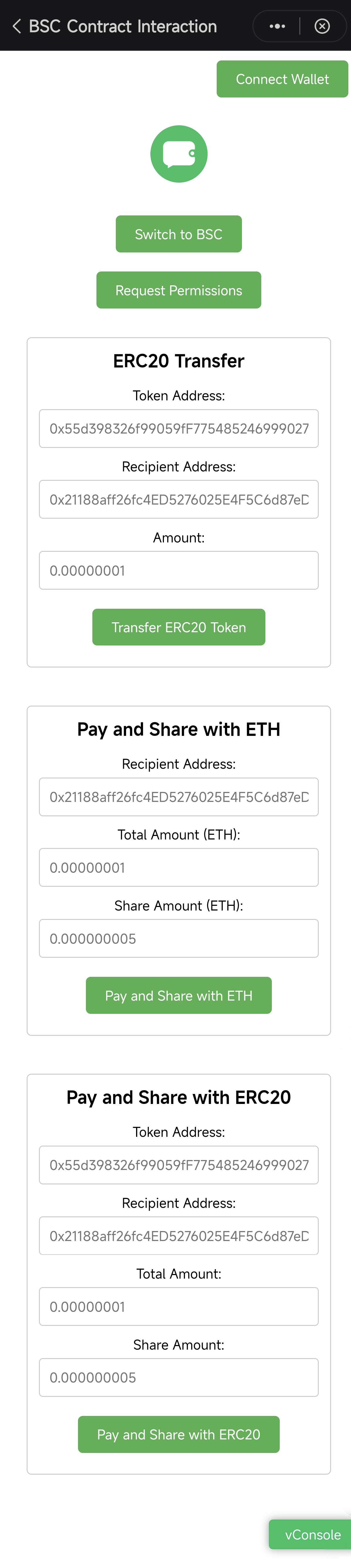
Instructions:
- Open the link above in the DeBox App.
- Click the buttons on the page to call the corresponding shares methods (native token payment shares, ERC20 token payment shares).
- Observe the detailed call process and execution results in the "vConsole" at the bottom right of the page.
- This demo is a standalone HTML file. You can press F12 in your browser to open the developer tools and view its source code to understand the specific integration method.