# DeBox Developer Documentation
> DeBox developer documentation: bot OpenAPI, Go / Node.js / Python SDKs, open platform capabilities and FAQ.
This file follows the llmstxt.org standard and contains the complete DeBox developer documentation in Markdown, suitable for full-context indexing or offline reference. To locate pages by section instead, use the smaller index at https://docs.debox.pro/en/llms.txt.
## DeBox User Guide
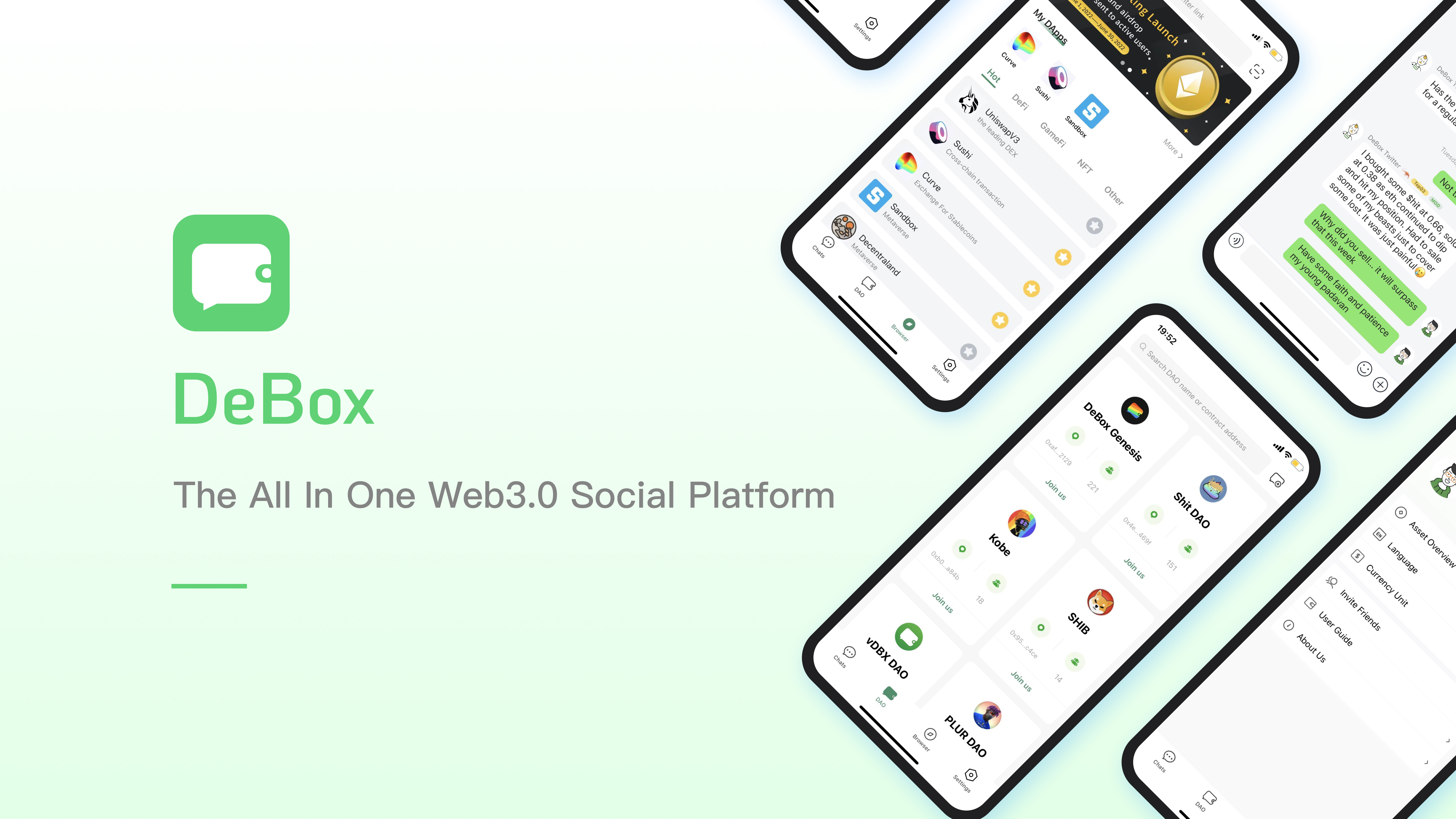
## What Can DeBox Do For Me?
**DeBox is an all-in-one Web3 community management tool designed to establish a trustworthy data ecosystem. By logging in with a Web3 wallet, you can engage in private chats, small group chats, Club chats, DAO/NFT chats (Token-gated chats), post updates, view everyone’s updates, and see on-chain updates from those you follow.**
:::tip Get Started
- **Official Website**
- **Web App**
- **Beginner Community**
:::
:::info Technical Support
- Feel free to join the DeBox technical discussion group: Click to Join
- Issue Feedback: 【My】- Top Right 【Settings】-【Feedback】to submit
:::
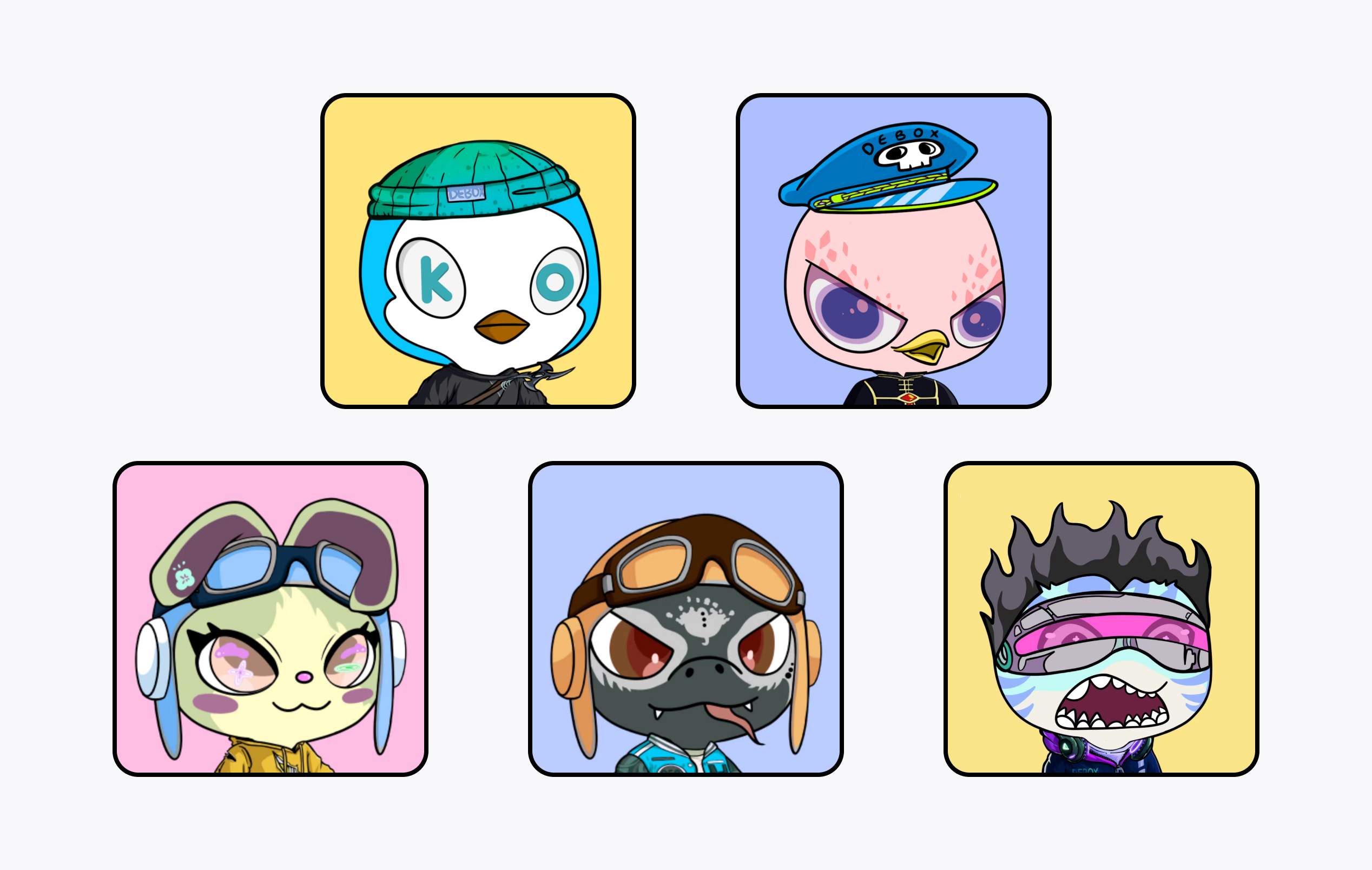
## What NFTs Has DeBox Officially Issued?
### DeBox Guardians Penguin (DGP)
> Nickname: Penguin
> Penguins are OGs with significant governance rights and influence in the community.
### DeBox Guardians Eagle (DGE)
> Nickname: Eagle
> Eagles are enforcers who oversee and manage the community to ensure members follow the rules and guidelines.
### DeBox Guardians Rabbit (DGR)
> Nickname: Rabbit
> Rabbits are builders who drive community development, often serving as developers.
### DeBox Guardians Cobra (DGC)
> Nickname: Cobra
> Cobras represent the foundation, driving community growth and governance, enhancing users' premium Web3 social experience.
### DeBox Guardians Shark (DGS)
> Nickname: Shark
> Sharks are pioneers, brave and powerful. They explore the boundaries of DeBox and enhance the robustness of the entire DeBox ecosystem.
## How to Log into DeBox?
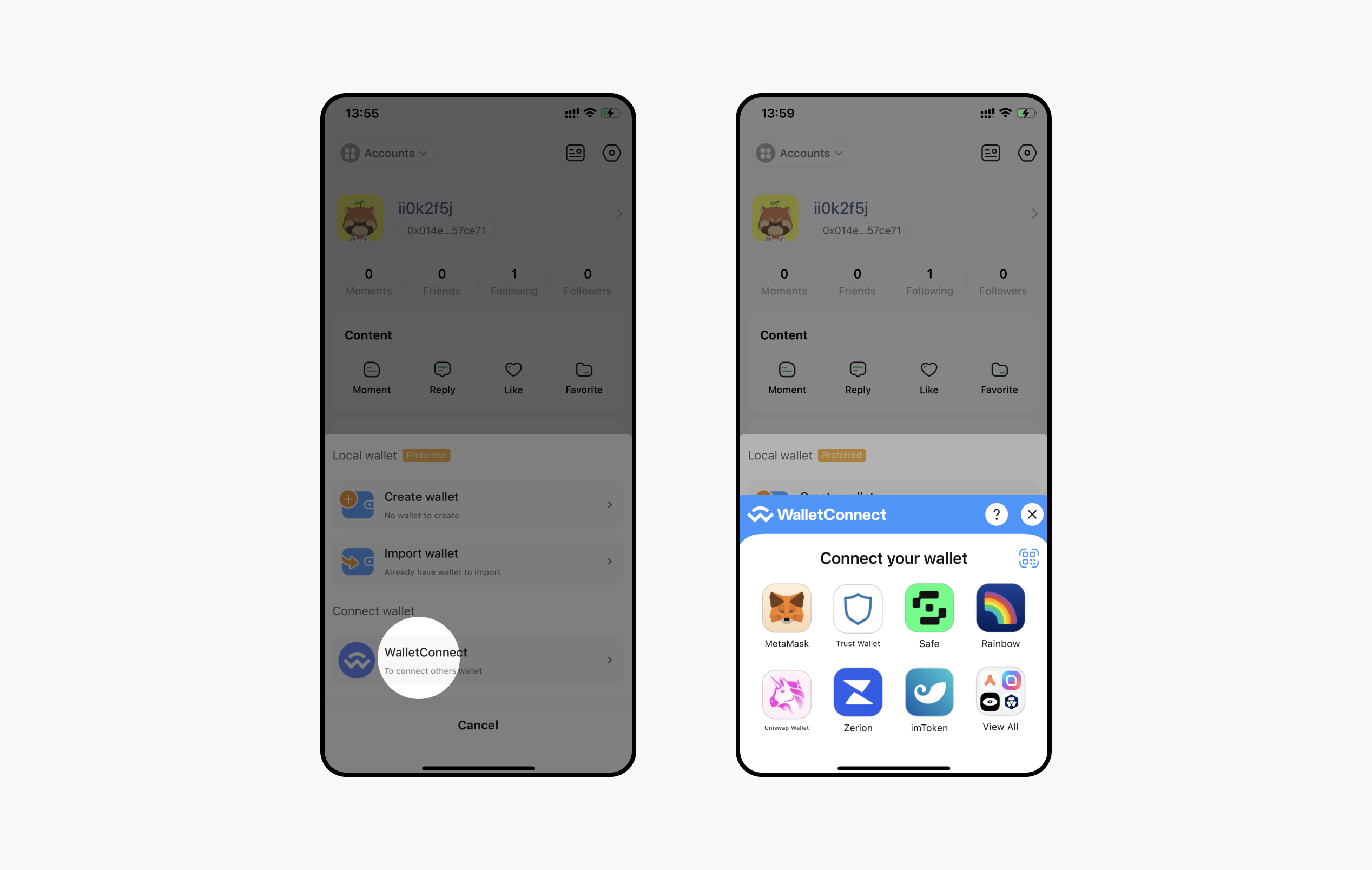
DeBox offers two wallet login methods: login with a local wallet 【Recommended】 or connect with a wallet app;
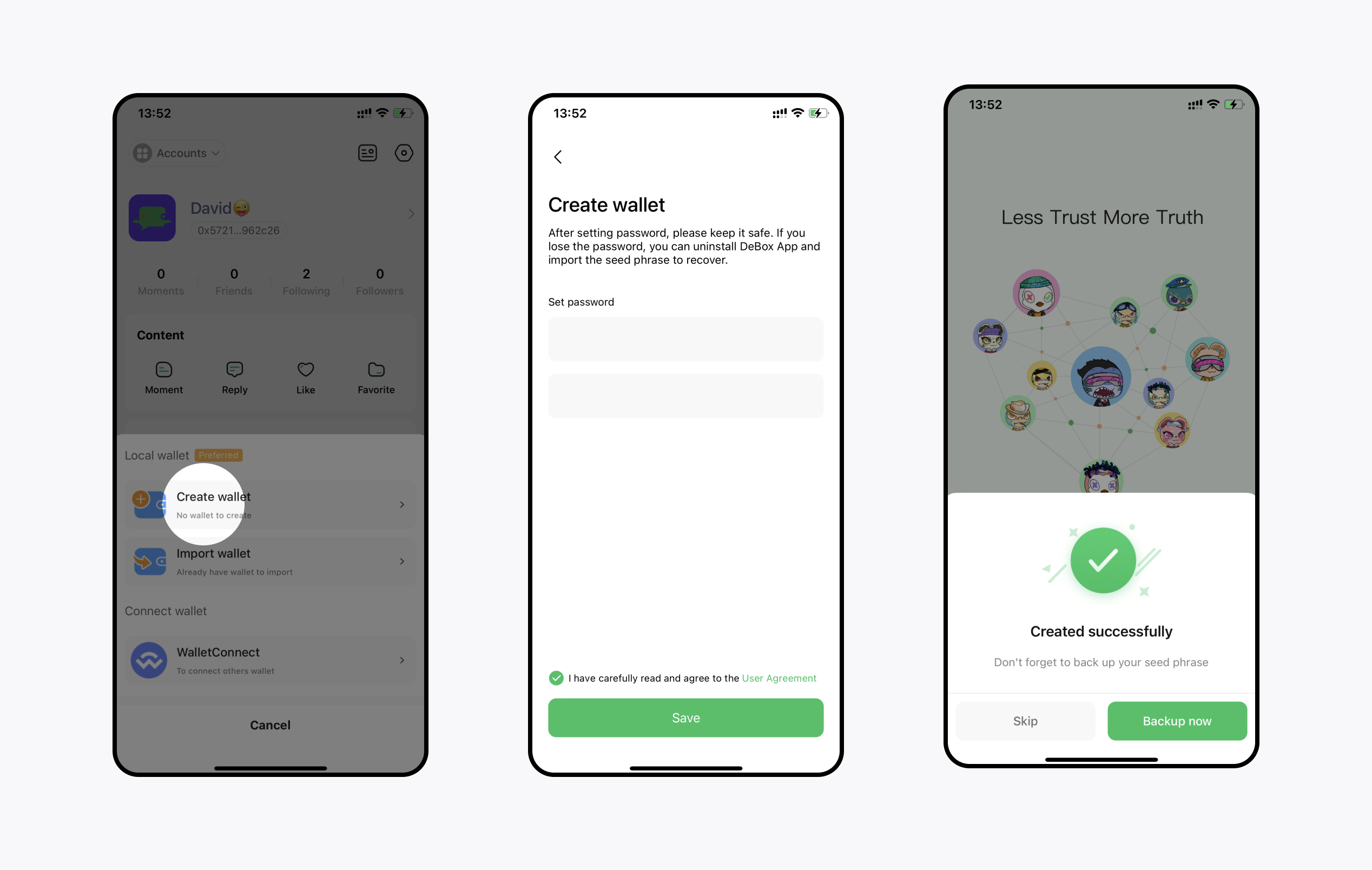
### Create a Wallet if You Don’t Have One
App top left 【Accounts】-【Add】-【Create Wallet】- Set password - Successfully created - Backup personal mnemonic. Note that the DeBox server does not save your private key. Be sure to back up your mnemonic and keep your mnemonic and private key safe to ensure asset security.
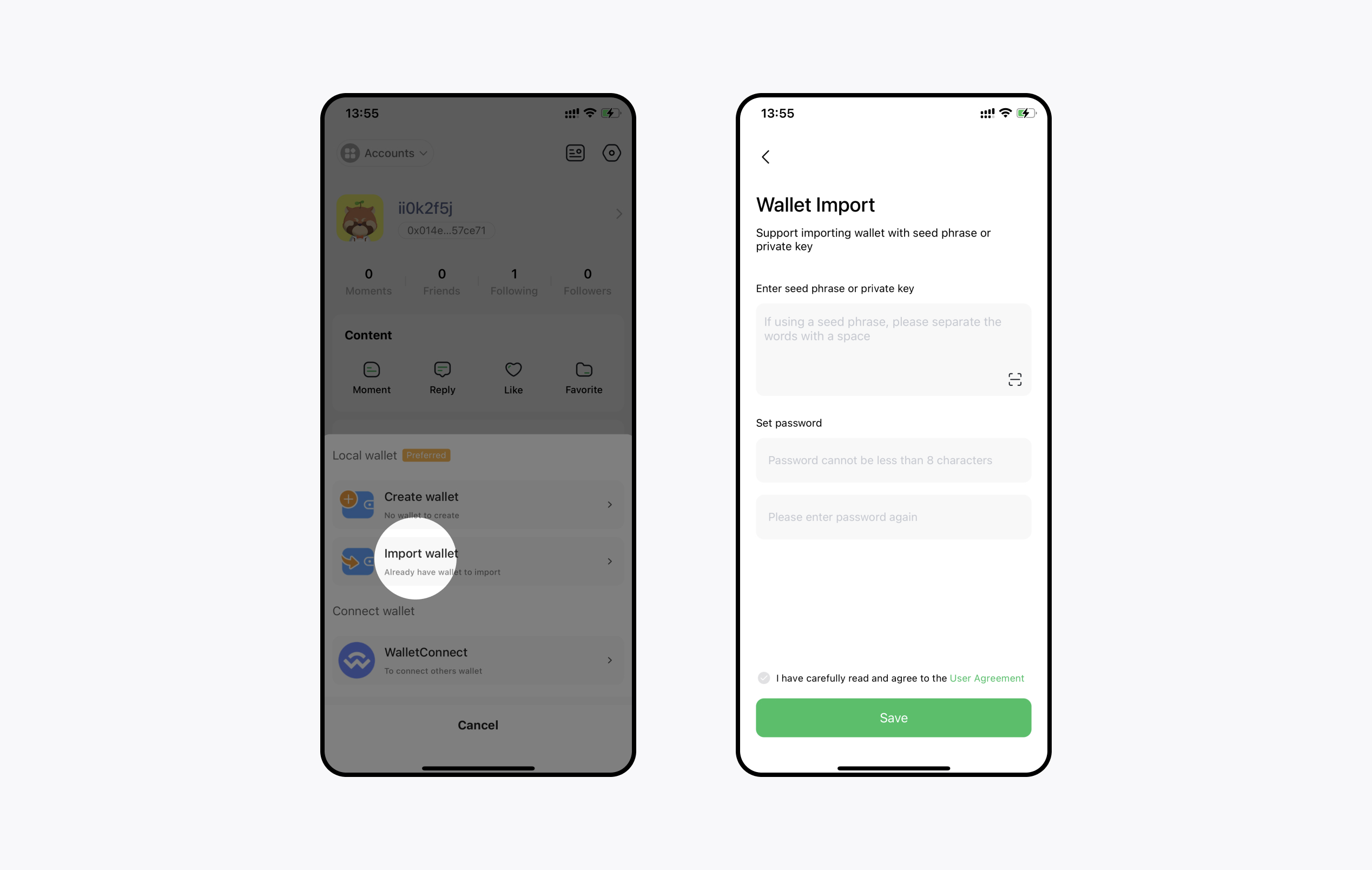
### Import an Existing Wallet
App top left 【Add Wallet】-【Import Wallet】- Copy private key or mnemonic - Set password -【Import】
### If You Don’t Want to Import a Private Key
Top left 【Add Wallet】- Choose WalletConnect or TokenPocket - Jump to authorization confirmation, which requires network service support. If authorization and jump fail, check your network or use a local wallet login.
## How to Set Your NFT as Your Avatar?
### How to Set Your NFT as Your Avatar?
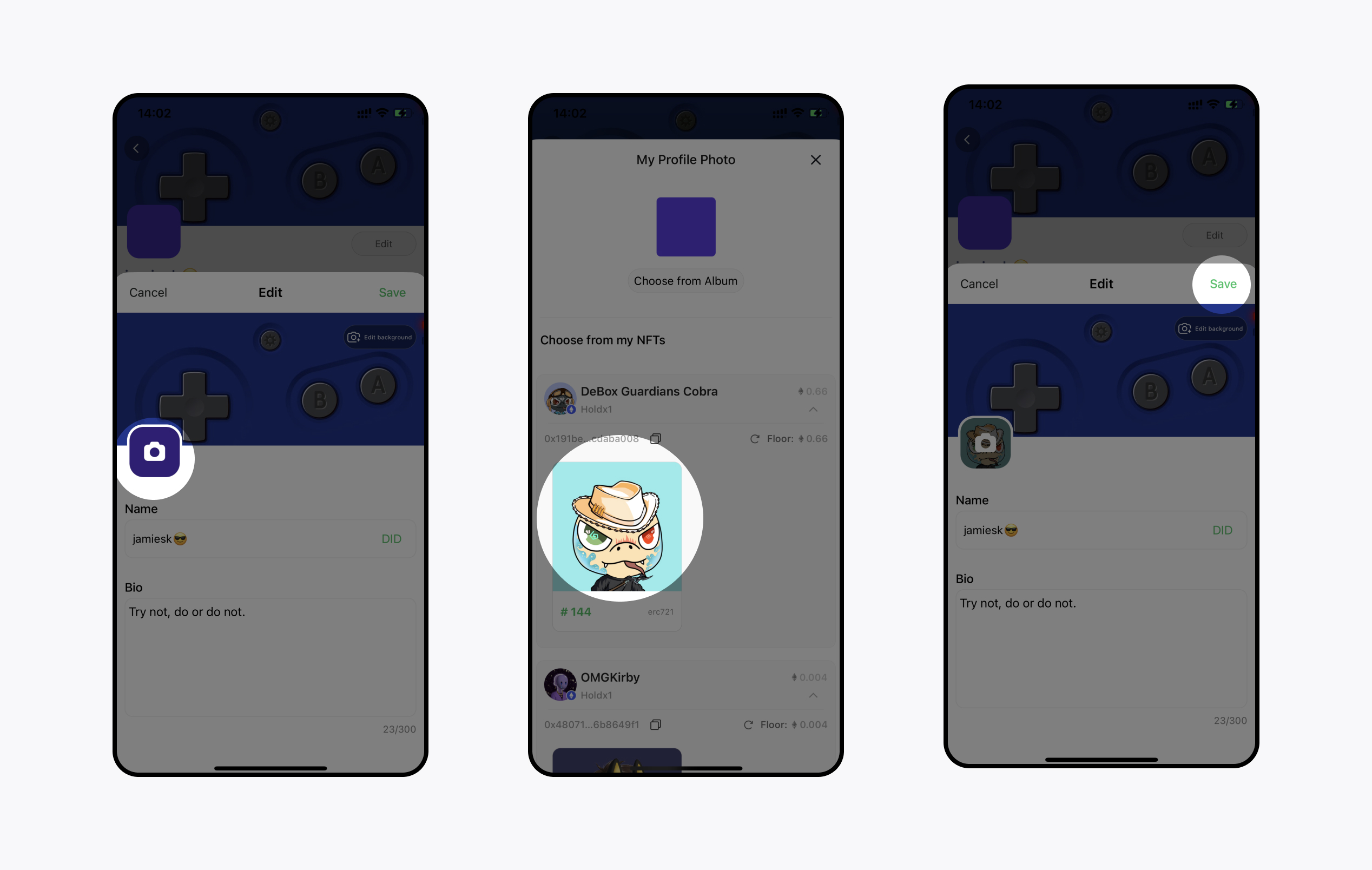
【Personal Profile】-【Edit】- Avatar - Choose owned NFT -【Save】.
### How to Set Your Domain Name as a Nickname?
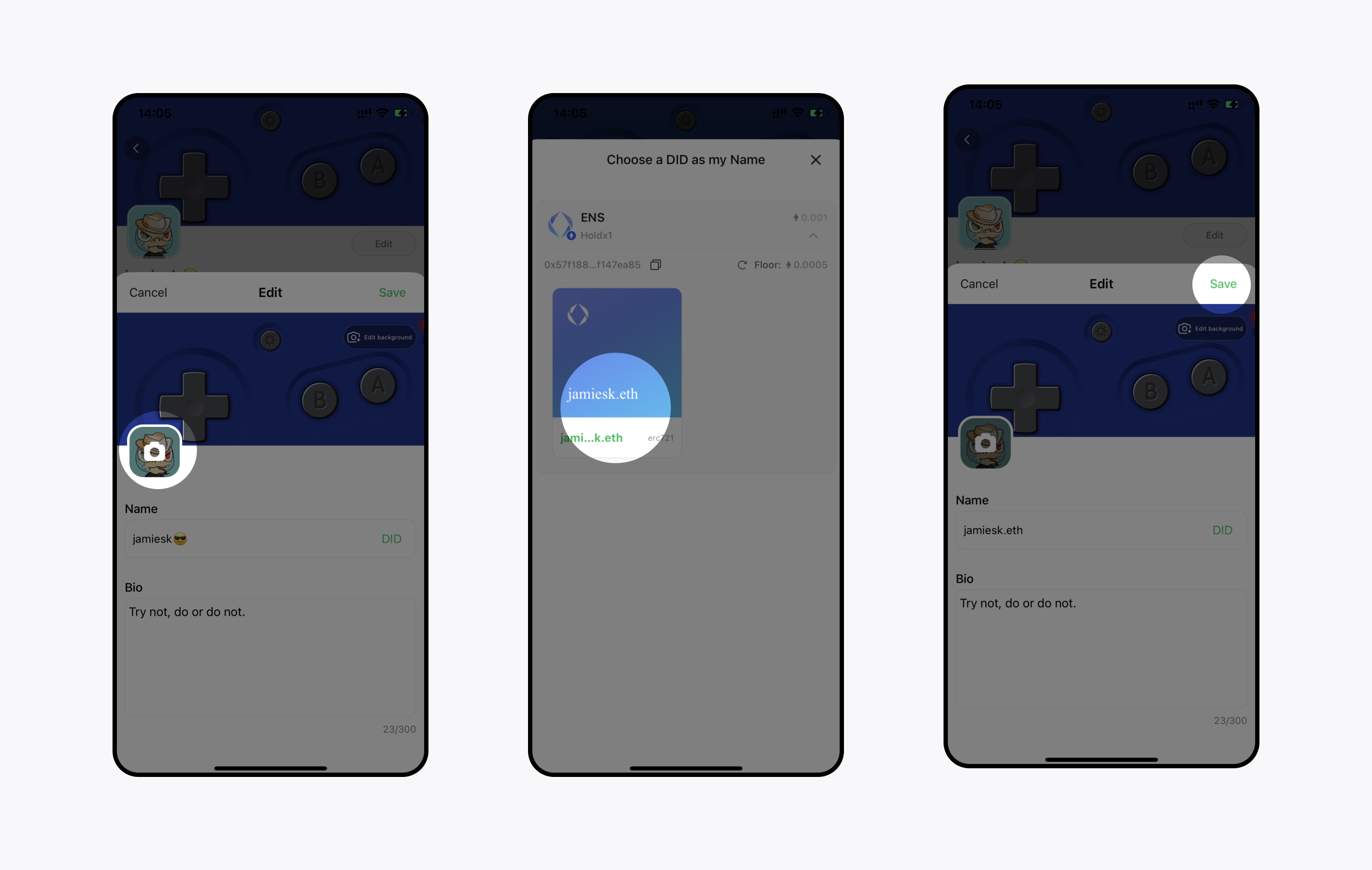
【Personal Profile】-【Edit】- Click 【DID】- Choose DID -【Save】.
## How Do I Send Private Messages to My Friends?
### How Do I Send Private Messages to My Friends?
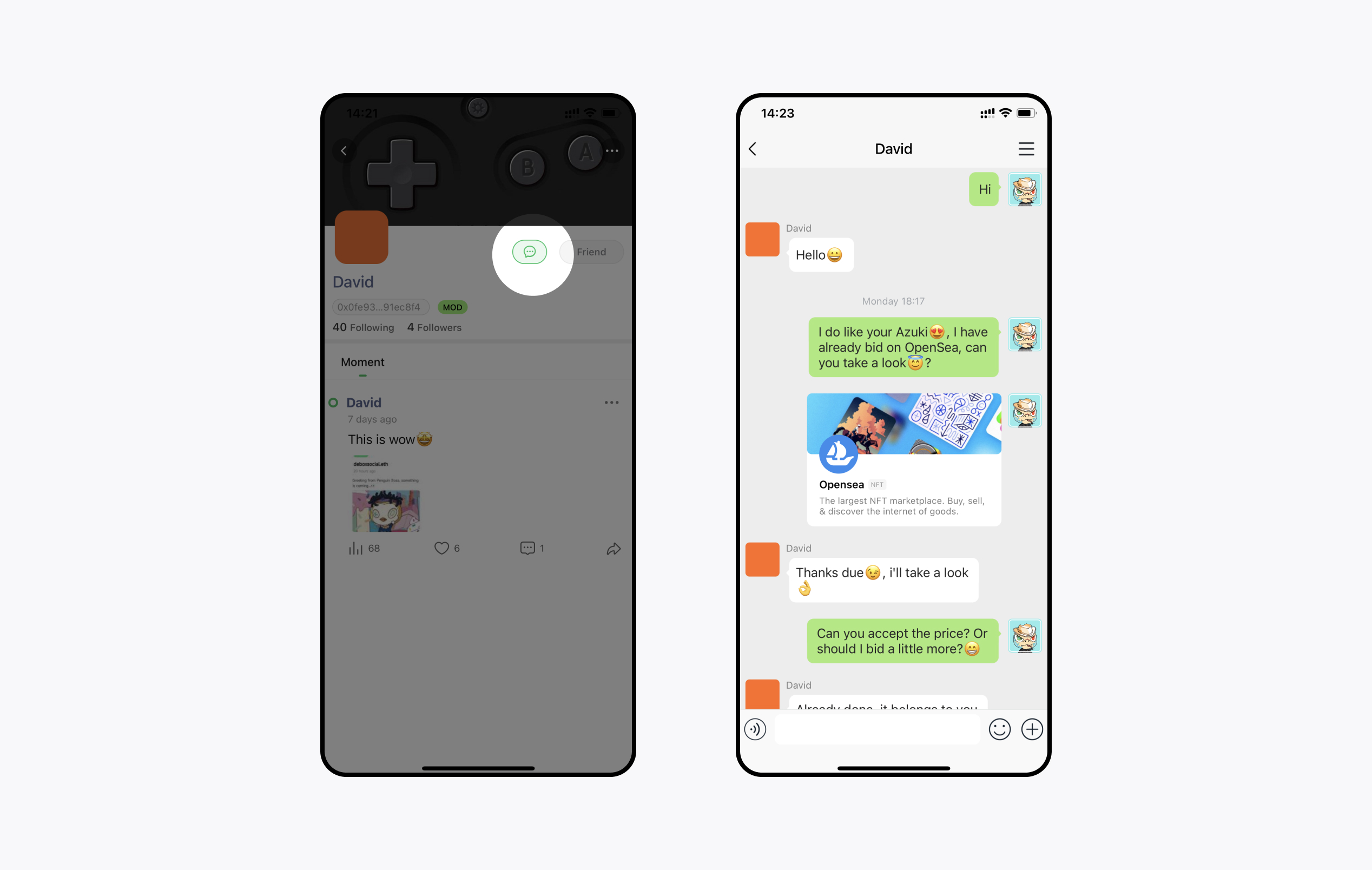
Click on 【The Other Party’s Avatar】- The 【Chat Button】 next to the follow button. If you cannot chat, it means the other party has not enabled private messaging permissions for you. To change your private message settings, go to 【My】-【Settings】-【Privacy】-【Private Message Permissions】. By default, 【Only people I follow can message me】 to avoid spam. You can choose 【Anyone can message me】 or 【No one can message me】.
## How Do I Create a Group?
Small groups are multi-person chats with up to 500 people. You can invite multiple friends for small group chats. Discover various popular activities in the Events section and join corresponding chat groups for real-time discussions.
### How to Create?
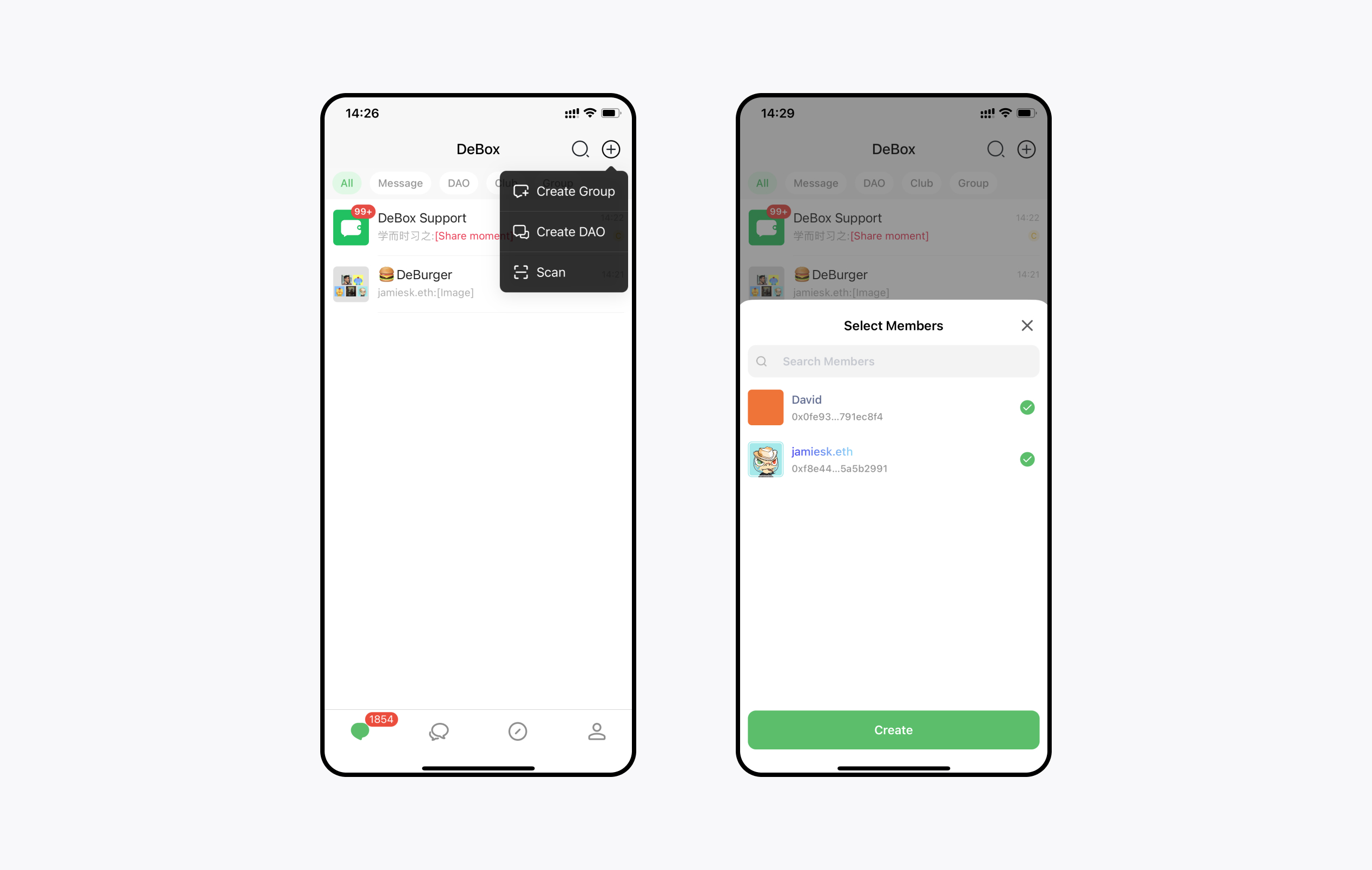
Bottom 【Chat】- Top right 【+】-【Create Small Group】-【Select Members】-【Create Now】. If the number of people reaches the limit, go to the Web App 【Community】-【Manage】- Upgrade to Club Chat - Increase the number of people.
## How to Create/Join a Club?
A Club is a group chat with over 500 people, where the Club owner and administrators have access to community tools.
### Create a Club
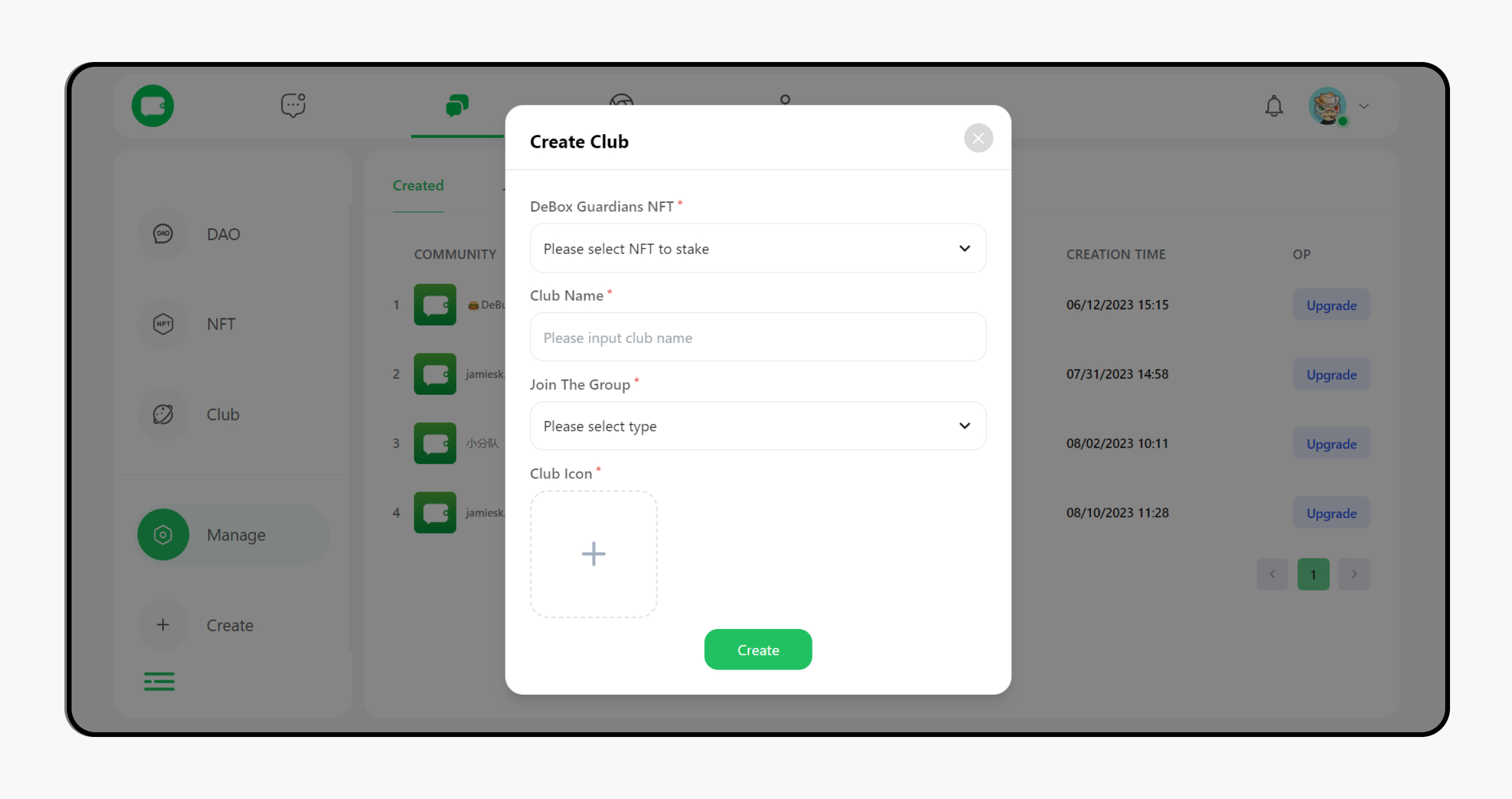
【Web APP】-【Community】-【Create】-【Create Club】-Please select NFT to stake - Please input club name, icon and type - 【Create】 (this process requires gas fees).
### Join a Club
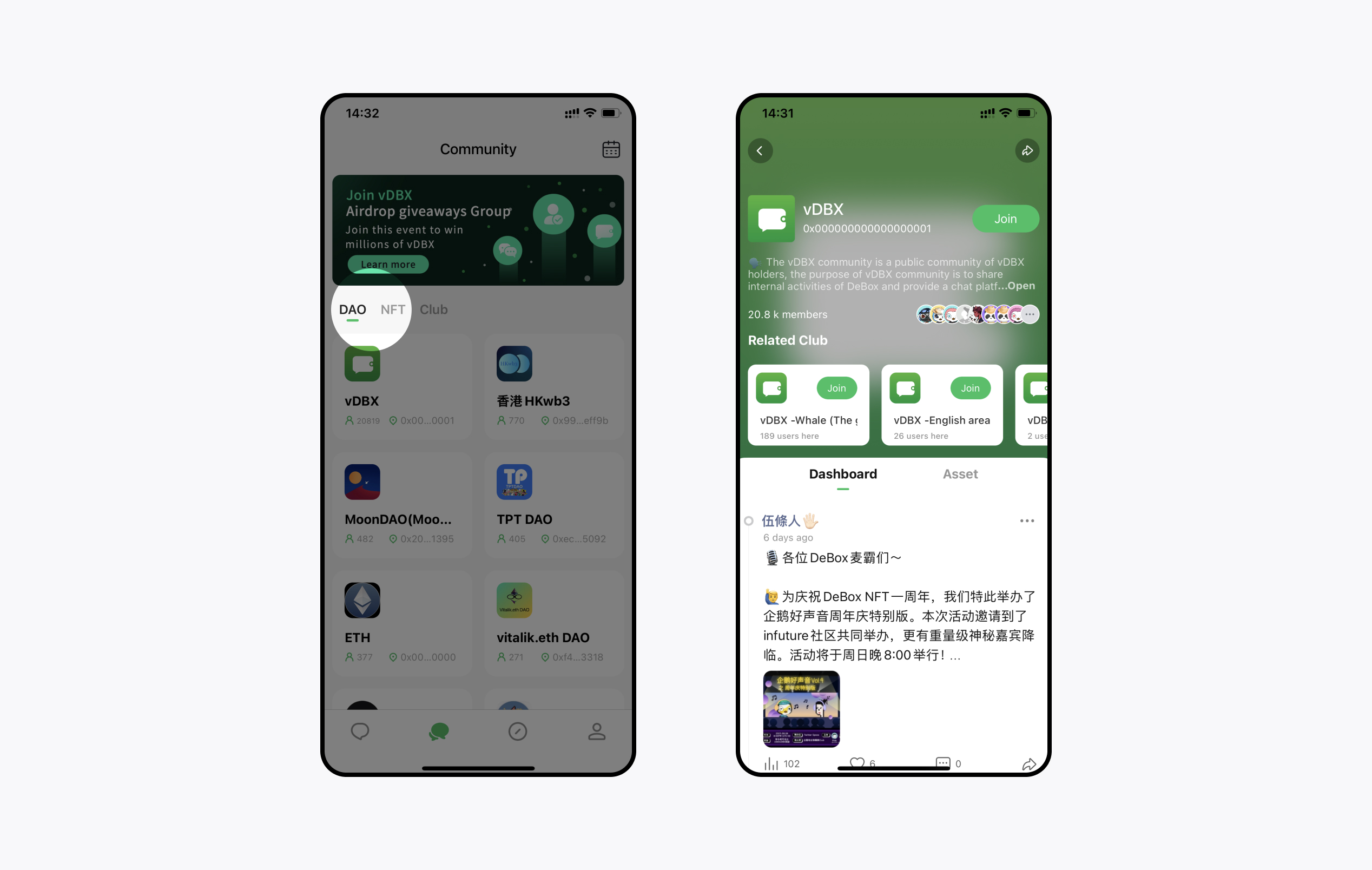
【Community】- select 【Club】 to join. Some Clubs have specific joining requirements set by the owner. Applications may need review, assets, or payment.
## What is Token-gated Chat?
Token-gated chat requires users to hold corresponding Tokens/NFTs to join the group.
### Join DAO/NFT
【Community】- Choose DAO/NFT to join.
### Create DAO/NFT
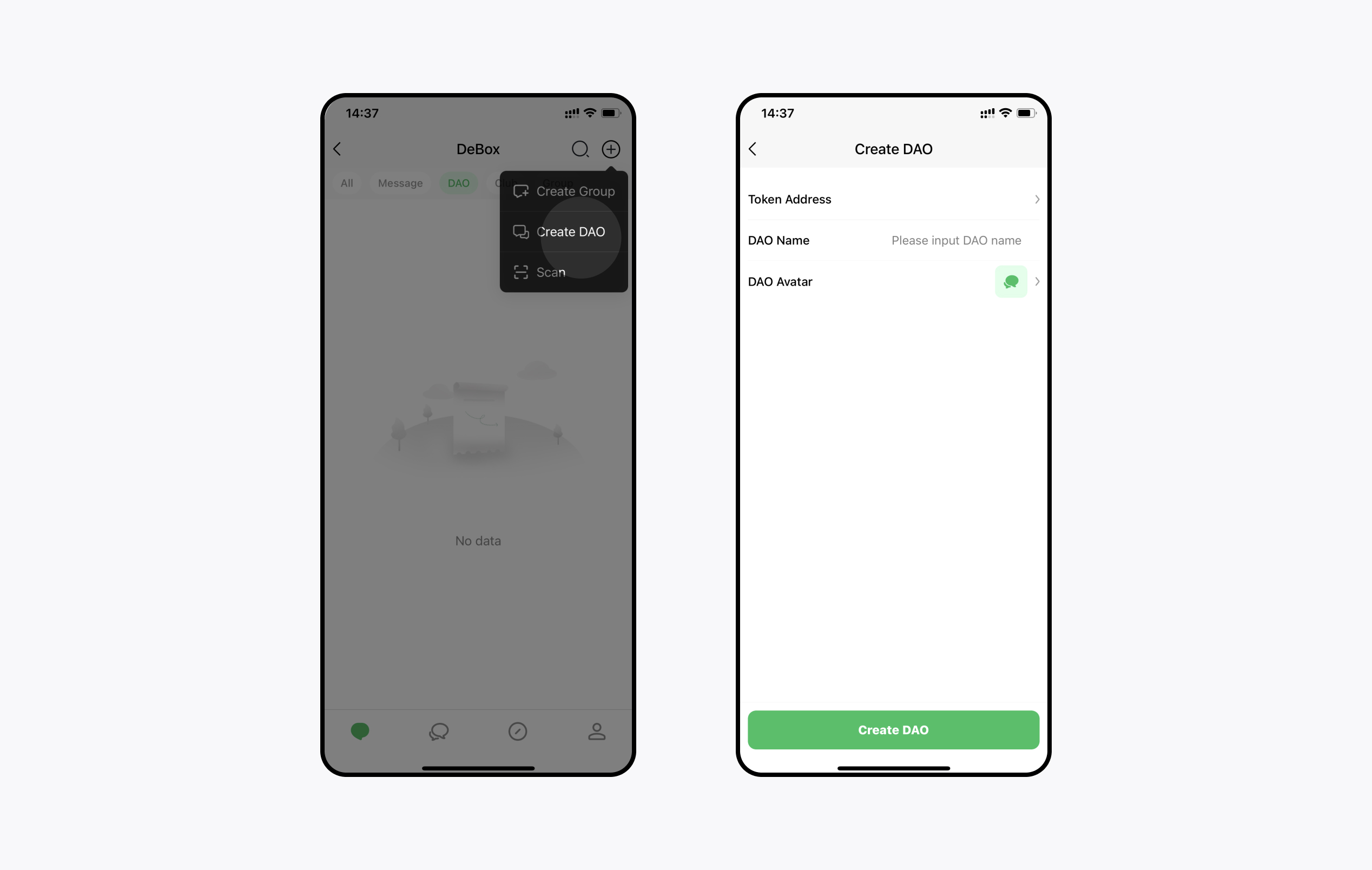
【Chat】 - 【+】 - 【Create DAO】 - Choose Token/NFT - Set Name and Avatar - 【Create】
## What Fun Community Tools Are Available?
### What Fun Community Tools Are Available?
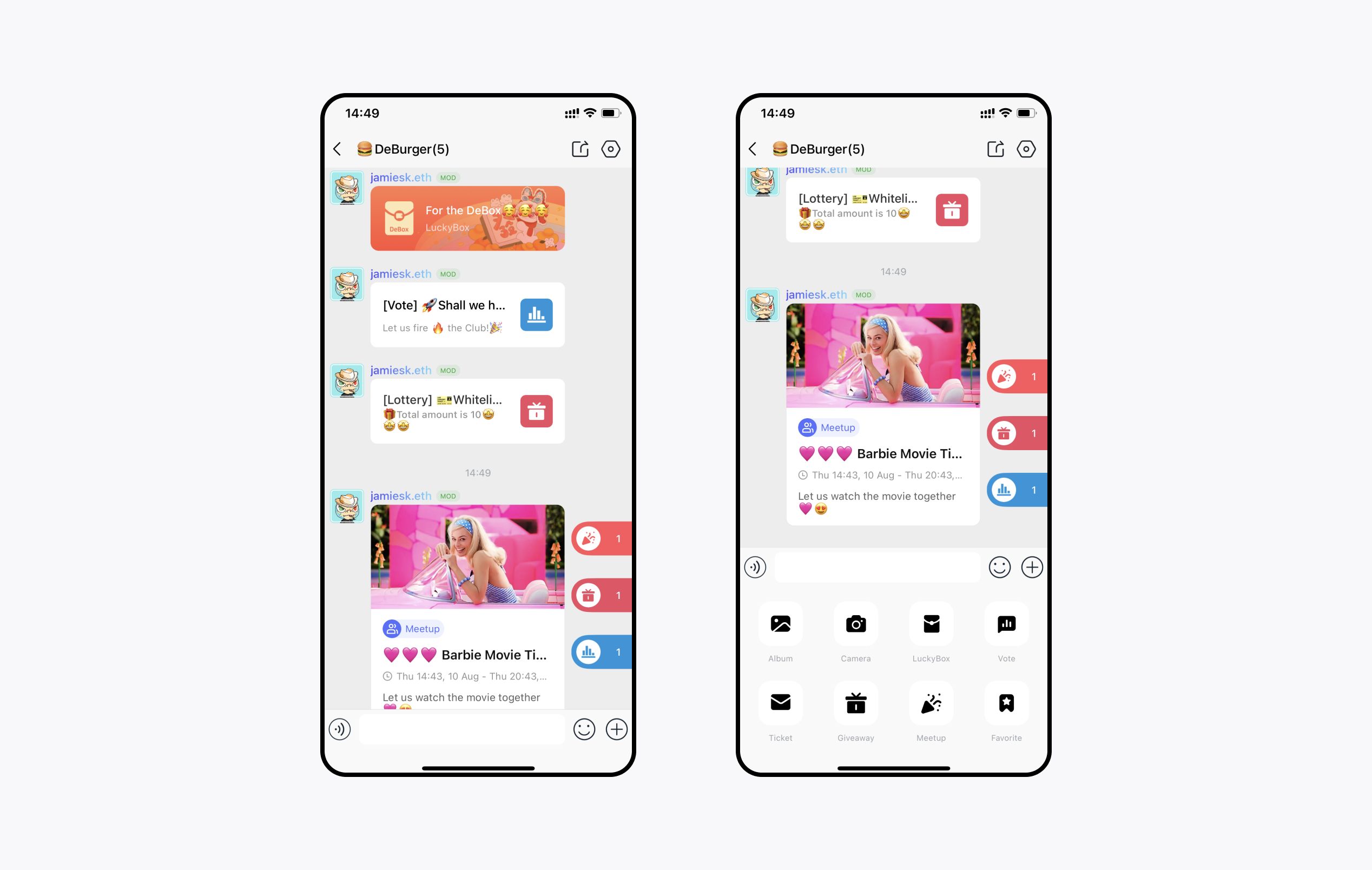
Enter the community - bottom 【+】 - 【Vote】 【Giveaway】 【Meetup】 - Participate/Send; you can also participate in the community through a message card, Or participate in the floating window on the right.
## What Content Can I See on the Discover Page?
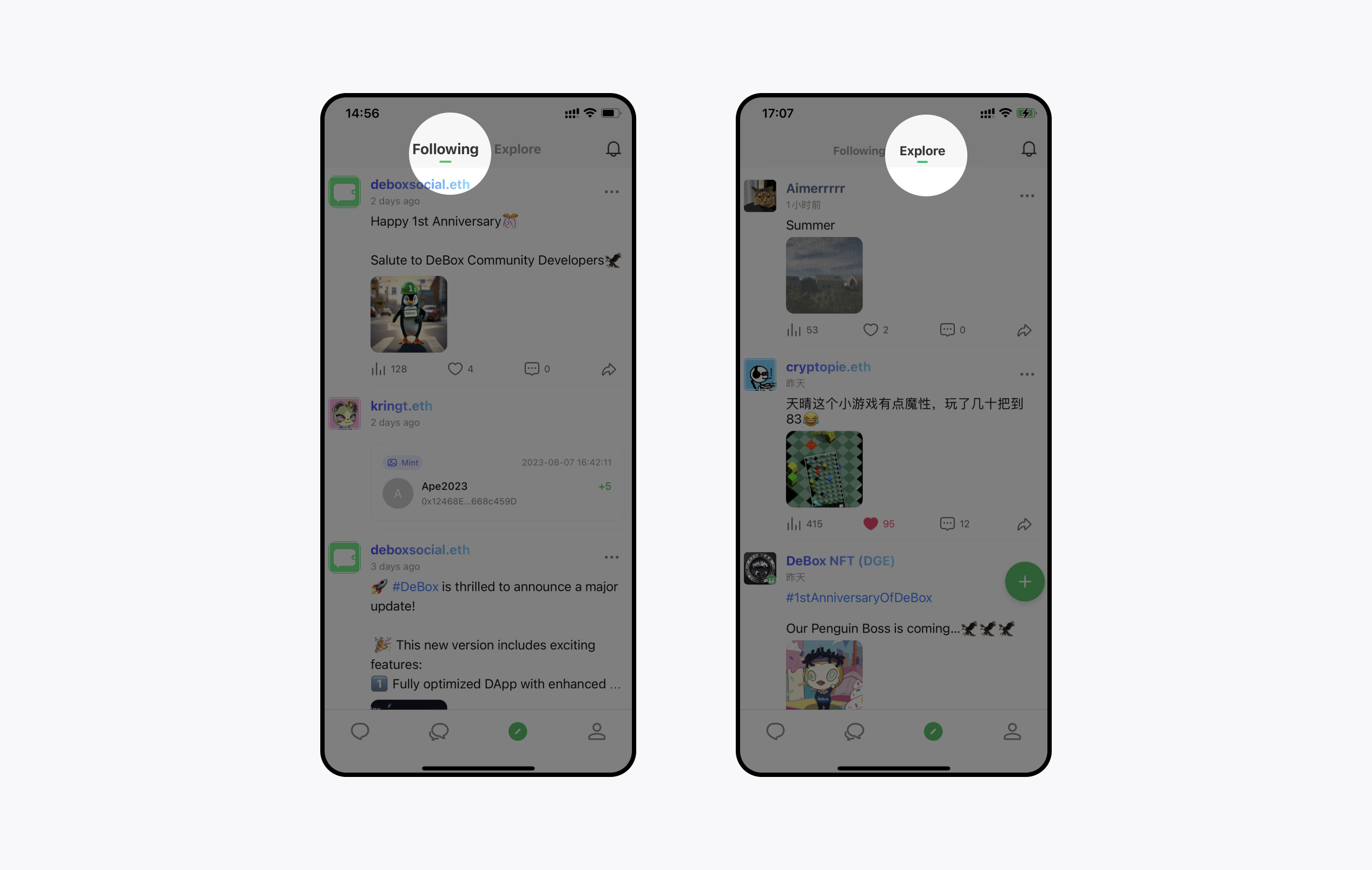
On the Discover page, you can post updates, browse updates, comment, and follow other users.
### View Everyone's Updates
In 【Discover Page】-【Explore】, browse everyone’s updates. The platform recommends high-quality updates based on your preferences.
### View Updates from People You Follow
Switch from 【Explore】 to 【Following】. You can browse real-time updates and on-chain updates from people you follow, discover trading behaviors, understand trading strategies, investment trends, and projects they are involved in.
View More
---
## DeBox Open Capabilities
DeBox provides a practical developer surface for building bots, DApps, and ecosystem integrations around communities and Web3 user interactions.
## Capability Map
### 1. DeBox DApp
- Build in-app Web experiences inside DeBox.
- Use injected wallet providers (`window.deboxWallet`, `window.ethereum`, `window.solana`) for Web3 interactions.
- Read DApp runtime and permission flow in [DeBox DApp](/MiniApp).
### 2. OpenClaw DeBox Plugin
- Connect OpenClaw workflows with DeBox bot channels.
- Suitable for teams already operating OpenClaw multi-channel automation.
- Installation and setup: [OpenClaw DeBox Plugin](/APIs/OpenClaw-Plugin-Install).
### 3. DeBox Shares Protocol
- Integrate permissionless automated revenue sharing into product payments.
- Supports on-chain payment split patterns and settlement workflows.
- Integration guide: [DeBox Shares Protocol](/Shares).
### 4. DeBox Grant Program
- Apply for ecosystem support if your project is actively integrated with DeBox capabilities.
- Program details and application path: [DeBox Grant Program](/OpenPlatformGrant).
## Recommended Integration Path
1. Define your product path: bot, DApp, or both.
2. Complete bot capability onboarding via [DeBox Bot Guide](/APIs/BotGuide).
3. Integrate APIs using [DeBox Developer OpenAPI](/ApiOnePage).
4. For Go stacks, choose either [Go SDK Long Polling](/GO-SDK) or [Go SDK Webhook](/GO-SDK-Webhook) based on message receive mode.
5. If needed, add Shares and Grant participation after core capability is stable.
## Support
- Developer portal: [developer.debox.pro](https://developer.debox.pro)
- Developer troubleshooting: [Developer FAQ / Troubleshooting](/APIQA)
---
## DeBox DApp
Developer-facing DApp integration guide (current version).
## 1. What is a DApp
A DeBox DApp is an H5 app running inside the DeBox built-in browser.
You can:
- Reuse existing web pages for fast integration
- Use injected wallet objects for on-chain interactions
- Call DeBox OpenAPI from your backend for messaging/user/group features
## 2. Quick start
1. Create an app on [DeBox Open Platform](https://developer.debox.pro) and get `API Key`.
2. Prepare a publicly reachable HTTPS web app.
3. Implement DeBox environment detection and wallet flows.
4. Keep OpenAPI calls on your backend (never expose secrets in frontend).
## 3. Runtime detection
```js
const isDeBoxUA = !!window?.navigator?.userAgent?.includes("DeBox")
const hasDeBoxWallet = typeof window?.deboxWallet !== "undefined"
const hasEthereum = typeof window?.ethereum !== "undefined"
const hasSolana = typeof window?.solana !== "undefined"
```
Recommendation:
- Use `hasDeBoxWallet || hasEthereum` as your EVM capability check.
- Add graceful fallback for non-DeBox runtime.
## 4. Wallet and user-info capabilities
Primary entry is `window.deboxWallet` (EVM-compatible).
### 4.1 Request permissions
```js
await window.deboxWallet.request({
method: "wallet_requestPermissions",
params: [{ eth_accounts: { debox_getUserInfo: {} } }],
})
```
### 4.2 Get public user profile
```js
const userInfo = await window.deboxWallet.request({
method: "debox_getUserInfo",
params: [],
})
```
Example response (fields may vary by client version):
```json
{
"uid": "jkdi123",
"address": "0xa56b4f0c7622bd076c2ba48b17d1e8d3fbf5303e",
"name": "Alice",
"avatar": "https://...png"
}
```
## 5. Backend OpenAPI integration (recommended)
Security baseline:
- Frontend calls your backend only.
- `X-API-KEY`, signature params, and app secret stay server-side.
Primary API reference:
- [DeBox Developer OpenAPI](/ApiOnePage)
## 6. Message sending (current API)
Use `POST /openapi/bot/sendMessage`:
```bash
curl -X POST "https://open.debox.pro/openapi/bot/sendMessage" \
-H "Content-Type: application/json" \
-H "X-API-KEY: YOUR_APP_KEY" \
-d '{
"chat_id": "cc0onr82",
"chat_type": "group",
"content": "Hello from DApp",
"parse_mode": "richtext"
}'
```
Field notes:
- `chat_type`: `group` | `private`
- `chat_id`:
- group -> `gid`
- private -> user `user_id`
- `content`: message body
- `parse_mode`: default `richtext`
## 7. Production checklist
1. HTTPS and mobile adaptation are complete.
2. Runtime detection + fallback path are verified.
3. Wallet permission flow handles reject/cancel/success.
4. OpenAPI calls are backend-only.
5. Logs contain request id, user identity, endpoint, and error code.
## 8. FAQ
1. OpenAPI fails when called directly in browser:
- Expected; move calls to backend.
2. Message send failures:
- Check `chat_type/chat_id` mapping.
- Check non-empty `content` and valid `parse_mode`.
3. Wallet object missing:
- Not in DeBox runtime or unsupported client version.
## 9. Related docs
- [DeBox Developer OpenAPI](/ApiOnePage)
- [DeBox Chat Bot Guide](/APIs/BotGuide)
- [DeBox Bot Go SDK](/GO-SDK)
- [DeBox Bot Go SDK Webhook](/GO-SDK-Webhook)
---
## OpenClaw DeBox Plugin
# Install DeBox Plugin on OpenClaw
This guide explains how to install and enable the official DeBox plugin on OpenClaw.
## Prerequisite
- You already have OpenClaw installed.
- You already created a DeBox Bot with **BotMother**.
- `yourDeBoxBotToken` is the **API Key** of that bot from BotMother.
## Step 1: Install plugin
```bash
openclaw plugins install @descartes_1/debox@latest
```
## Step 2: Add DeBox channel with bot token
```bash
openclaw channels add --channel debox --token "yourDeBoxBotToken"
```
## Step 3: Restart gateway
```bash
openclaw gateway restart
```
## Verify
Run:
```bash
openclaw channels list
```
If configured correctly, you should see DeBox channel/account in the output.
---
## DeBox Permissionless Shares Protocol
:::tip Shares V2
🎉 The DeBox Shares V2 protocol is now live!
⚡ If you have previously integrated Shares V1, no code changes are required!
Automatically upgrade to V2, enjoying higher commissions, enhanced features, and a better experience!
🚀 Start integrating the DeBox Shares protocol now and unlock a new revenue model!
:::
## DeBox Shares Introduction
### 1. What is DeBox Shares?
- DeBox Shares is an underlying revenue-sharing protocol uniquely developed based on the DeBox product, connecting project parties with DeBox groups.
- It operates through DeBox's product and social relationships.
- Project parties can integrate without permission—simple and fast, completing the process in just 10 minutes.
- Groups and inviters can receive instant rebates of up to 80% from project parties. Based on the DeBox Shares protocol and DeBox group functionalities, everyone can open a decentralized exchange after universal on-chain assetization.
- The DeBox Shares protocol is a permissionless and decentralized protocol. The DeBox platform does not and will not endorse any projects integrated with DeBox Shares.
### 2. What are the benefits for project owners activating DeBox Shares?
- Through DeBox Shares, projects can reach 10 million real users and 300,000 private community groups. Promoting a project in any group can gain recognition and support from group administrators.
## What participation methods does Shares support?
1. Supports on-chain Token payments: Call the DeBox-Shares contract and slightly adjust the DAPP's payment contract code;
2. Supports multiple networks: Currently supports ETH, Arbitrum, Base, BSC, OP, Polygon network assets (continuously updating).
## How to integrate Shares?
### 1. Integrate Shares
- The DeBox Shares protocol is an automated revenue-sharing tool specifically designed for developers to simplify the transaction distribution process.
- When developing programs on the DeBox platform, developers only need to set the distribution ratio. There is no need to handle complex logic involving sharers, invitation codes, etc., as the DeBox Shares protocol automatically completes the revenue distribution for each transaction.
- Developers can use the DeBox SDK to create various functionalities and encourage users to promote and use these programs through revenue sharing. When users open a mini-program via a shared link and complete a transaction, the protocol automatically allocates the revenue according to the predefined ratio.
- The Box payment process includes two main steps: connecting the wallet and obtaining authorization, and calling the payment API to complete the payment. After the payment is completed, you can view the payment details. Here are the detailed steps and usage methods:
#### 1.1 Connect Wallet and Request Authorization
- DAPP can connect to the user's wallet and obtain the required user information through the DeBox Wallet SDK.
> The DeBox Wallet SDK is a tool for DAPP to connect and interact with the DeBox wallet. When users open the webpage through the DeBox client, DeBox will automatically inject the `window.deboxWallet` object into the webpage (it can also be accessed through the alias `window.ethereum`). DAPP can use this object to detect whether the DeBox wallet is installed and call the corresponding API methods for operation.
>
- The following methods can be used for this process:
**eth_requestAccounts**: This method requests user wallet authorization to connect.
- [Common wallet methods](https://docs.metamask.io/wallet/reference/eth_requestaccounts/), extended by DeBox.
- Internally, this method calls `debox_getUserInfo` to request user information permissions.
- This method will pop up a window asking the user to authorize the connection to the DAPP and obtain the wallet address.
**Request:**
```jsx
await window.deboxWallet.request({
"method": "eth_requestAccounts",
"params": [],
});
```
**Parameters:**
- None
**Response:**
- Returns the user's wallet address upon success.
```jsx
[
"0xf39Fd6e51aad88F6F4ce6aB8827279cffFb92266"
]
```
**wallet_requestPermissions**: This method requests user approval for DAPP access permissions.
- Methods that require prior user authorization include: `debox_getUserInfo` (to get user public information).
1. Permission request information parameters are empty. By default, it will request user approval for the `debox_getUserInfo` method.
**Request:**
```jsx
await window.deboxWallet.request({
"method": "wallet_requestPermissions",
"params": [{
eth_accounts: {}
}],
});
```
**Parameters:**
- `eth_accounts`: Its value is an empty object `{}`, indicating a request for default permissions (i.e., `debox_getUserInfo`).
**Response:**
- Returns upon success:
```jsx
[
{
"parentCapability": "eth_accounts",
"invoker": "https://connect-nu-one.vercel.app/",
"caveats": [
{
"type": "restrictReturnedAccounts",
"value": [
"0xa56b4f0c7622bd076c2ba48b17d1e8d3fbf5303e"
]
},
{
"type": "debox_getUserInfo",
"value": {
"uid":"jkdi123",
"address":"0xa56b4f0c7622bd076c2ba48b17d1e8d3fbf5303e",
"name":"Tom",
"avatar":"https://debox......png"
}
},
],
"date": 1728348403194
},
]
```
2. Permission request information with parameters. At this time, the user will be asked to approve the permissions specified by the developer:
**Request:**
```jsx
await window.deboxWallet.request({
"method": "wallet_requestPermissions",
"params": [{
eth_accounts: {
"debox_getUserInfo": {},
}
}],
});
```
**Parameters:**
- `eth_accounts` property, with a value of an object specifying two permissions:
- `"debox_getUserInfo"`: Request permission to get user information (e.g., avatar, nickname), with an empty object `{}` as the value.
**Response:**
- Returns upon success:
```jsx
[
{
"id": "QbOgSTaFmS3UK1qS6pese",
"parentCapability": "eth_accounts",
"invoker": "https://connect-nu-one.vercel.app/",
"caveats": [
{
"type": "restrictReturnedAccounts",
"value": [
"0xa56b4f0c7622bd076c2ba48b17d1e8d3fbf5303e"
]
},
{
"type": "debox_getUserInfo",
"value": {
"uid":"jkdi123",
"address":"0xa56b4f0c7622bd076c2ba48b17d1e8d3fbf5303e",
"name":"张三",
"avatar":"https://debox......png"
}
},
],
"date": 1728348403194
},
]
```
**debox_getUserInfo**: This method retrieves the user's public information, such as user ID, wallet address, nickname, and avatar.
- **Prerequisite:** The user has approved access to `debox_getUserInfo` via `wallet_requestPermissions`, otherwise service is denied.
- If the user has not authorized access to `debox_getUserInfo`, a confirmation box will pop up asking for authorization, or service will be denied.
**Request:**
```jsx
await window.deboxWallet.request({
"method": "debox_getUserInfo",
"params": [],
});
```
**Parameters:**
- None
**Response:**
- Returns the user's basic information (ID, address, nickname, avatar) upon success if the user has authorized access.
```jsx
{
"address":"0xa56b4f0c7622bd076c2ba48b17d1e8d3fbf5303e",
"name":"Tom",
"avatar":"https://debox......png",
"uid":"jkdi123"
}
```
**Error Codes**
1. When the user has not authorized the method call
```jsx
{
"code": 4100,
"message": "The requested account and/or method has not been authorized by the user."
}
```
2. When the user rejects the request
```jsx
{
"code": 4001,
"message": "User rejected the request."
}
```
#### 1.2 Deployment and Interaction Example:
https://connect-nu-one.vercel.app/ (Open in DeBox)
Click each button to call the corresponding method, and observe the execution results in the "vConsole" at the bottom right.
Example Code:
```jsx
// test the availability of deboxWallet
if (typeof window.deboxWallet !== "undefined") {
window.ethersProvider = new ethers.providers.Web3Provider(
window.deboxWallet
);
console.log("deboxWallet is available");
} else {
console.error("deboxWallet is not installed!");
}
console.log(
"window.ethersProvider ethers provider:",
window.ethersProvider
);
// eth_requestAccounts
async function connectWallet() {
console.log("window.deboxWallet", window.deboxWallet);
if (typeof window.deboxWallet !== "undefined") {
// connectButton.addEventListener("click", async () => {
try {
// Request account access if needed
const accounts = await window.deboxWallet.request({
method: "eth_requestAccounts",
});
console.log("eth_requestAccounts: ", accounts, typeof accounts);
// Display the connected wallet address
walletAddress.innerText = `Connected Wallet: ${accounts[0].slice(
0,
6
)}...${accounts[0].slice(-4)}`;
errorMessage.innerText = "";
requestPermissions();
} catch (error) {
// Handle error (e.g., user denied account access)
errorMessage.innerText =
"Error connecting wallet: " + error.message;
}
} else {
// If no wallet is installed
errorMessage.innerText =
"No Ethereum wallet found. Please install DeBoxWallet.";
}
}
// wallet_requestPermissions
async function requestPermissions() {
console.log("testSDK run wallet_requestPermissions");
if (typeof window.deboxWallet !== "undefined") {
try {
window.deboxWallet
.request({
method: "wallet_requestPermissions",
params: [
{
eth_accounts: {},
},
],
})
.then((response) => {
console.log(
"wallet_requestPermissions: ",
response,
typeof response
);
});
} catch (error) {
console.error(error);
alert(error.message);
}
} else {
// If no wallet is installed
errorMessage.innerText =
"No Ethereum wallet found. Please install DeBoxWallet.";
}
}
// requestPermissionsParams
async function requestPermissionsParams() {
console.log("testSDK run wallet_requestPermissions");
if (typeof window.deboxWallet !== "undefined") {
try {
window.deboxWallet
.request({
method: "wallet_requestPermissions",
params: [
{
eth_accounts: {
debox_getUserInfo: {},
},
},
],
})
.then((response) => {
console.log(
"wallet_requestPermissions_params: ",
response,
typeof response
);
const item = response[0]; // []
const deboxUserInfo = item.caveats.find(
(caveat) => caveat.type === "debox_user_public_info"
);
if (deboxUserInfo) {
const avatar = deboxUserInfo
? deboxUserInfo.value.avatar
: null;
const name = deboxUserInfo ? deboxUserInfo.value.name : null;
const address = deboxUserInfo
? deboxUserInfo.value.address
: null;
const uid = deboxUserInfo ? deboxUserInfo.value.uid : null;
console.log(
"wallet_requestPermissions_params data",
response?.[0]?.caveats?.[1]
);
const imgElement = document.getElementById("walletAvatar");
imgElement.src = avatar;
walletNickName.innerText = `NickName: ${name}`;
walletAddress.innerText = `Connected Wallet: ${address?.slice(
0,
6
)}...${address?.slice(-4)}`;
walletUid.innerText = `uid: ${uid}`;
errorMessage.innerText = "";
}
});
} catch (error) {
console.error(error);
alert(error.message);
}
} else {
// If no wallet is installed
errorMessage.innerText =
"No Ethereum wallet found. Please install DeBoxWallet.";
}
}
// debox_getUserInfo
async function getUserInfo() {
console.log("testSDK run debox_getUserInfo");
window.deboxWallet
.request({
method: "debox_getUserInfo",
params: [],
})
.then((response) => {
console.log("debox_getUserInfo", response, typeof response);
if (response) {
const imgElement = document.getElementById("walletAvatarUser");
imgElement.src = response?.avatar;
walletNickNameUser.innerText = `NickName: ${response?.name}`;
walletAddressUser.innerText = `Connected Wallet: ${response?.address?.slice(
0,
6
)}...${response?.address?.slice(-4)}`;
walletUidUser.innerText = `uid: ${response?.uid}`;
errorMessage.innerText = "";
}
})
.catch((error) => {
console.error(error);
alert(error.message);
});
}
```
### 2. On-Chain Payment Integration with Shares
On-chain payment is a real-time shares distribution method. When users make payments using tokens, a portion of the payment amount is automatically donated to the DeBox Shares protocol for shares distribution, completing the revenue sharing process.
#### 2.1 On-Chain Payment Shares Process
There are two types of on-chain payment shares: native token (ETH) payment shares and ERC20 token payment shares:
**2.1.1 Native Token (ETH) Payment Shares**
The native token (ETH) payment shares involves two steps: calculating the shares amount and calling the contract's donation function to trigger subsequent processing.
1. **Calculate the Shares Amount**
- The Dapp calculates the shares amount to be distributed through the DeBox Shares protocol based on the business design.
2. **Call the `donationToShares` Method with the Shares Amount to Trigger Subsequent Logic:**
- After calculating the shares amount, the Dapp calls the DeBox Shares contract's `donationToShares` method to officially distribute the calculated amount.
```jsx
// ...
uint256 donatedAmountETH = amountAcquiredETH / 10; // Calculate the shares amount
doxShares.donationToShares{ value: donatedAmountETH }(); // Trigger subsequent shares logic
// ...
```
3. **Example Contract Logic**
- Example of a Dapp contract integrating the Shares protocol:
```solidity
// SPDX-License-Identifier: Apache License 2.0
pragma solidity ^0.8.22;
import { IERC20 } from "@openzeppelin/contracts/token/ERC20/IERC20.sol";
import { IDeBoxShares } from "@debox/deboxdapp/interfaces/facets/IShares.sol";
import { SafeERC20 } from "@openzeppelin/contracts/token/ERC20/utils/SafeERC20.sol";
contract PlayGameWithShares {
IDeBoxShares public doxShares;
event GamePlayed(address player, IERC20 token, uint256 amount);
constructor(IDeBoxShares _doxShares) {
doxShares = _doxShares;
}
// ETH payment function integrated with the Shares protocol in the Dapp
function playGameWithETH() external payable {
uint256 amount = msg.value;
uint256 donatedAmount = amount / 10;
if (donatedAmount > 0) {
doxShares.donationToShares{ value: donatedAmount }();
}
emit GamePlayed(msg.sender, IERC20(address(0)), amount);
}
}
```
**2.1.2 ERC20 Token Payment Shares**
The ERC20 token payment shares involves two steps: calculating the shares amount and authorizing the DeBox Shares contract, and calling the contract's donation function to trigger subsequent processing.
1. **Calculate the Shares Amount and Authorize the DeBox Shares Contract**
- First, the Dapp transfers the user's payment tokens to the Dapp contract and calculates the shares amount to be distributed through the DeBox Shares protocol based on the business design.
- Then, the contract calls the `safeIncreaseAllowance` method to authorize the DeBox Shares contract address to use the shares amount.
```solidity
// ...
SafeERC20.safeTransferFrom(token, msg.sender, address(this), amount); // Transfer the user's payment tokens to the Dapp contract
uint256 donatedAmount = amountAcquired / 10; // Calculate the shares amount to be distributed through the DeBox Shares protocol
SafeERC20.safeIncreaseAllowance(token, address(doxShares), donatedAmount); // Authorize the DeBox Shares contract to use the shares amount
// ...
```
2. **Call the `donationToShares` Method to Trigger Subsequent Shares Logic**
- After authorizing the shares amount, the contract calls the DeBox Shares contract's `donationToShares` method to officially distribute the calculated amount.
- This method triggers the subsequent processing logic of the DeBox Shares protocol, transferring the shares amount to the DAO asset pool or distributing it to beneficiaries.
```solidity
// ...
// The above logic for calculating the shares amount and authorizing the contract
// ...
doxShares.donationToShares(token, donatedAmount); // Trigger subsequent shares logic
// ...
```
3. **Example Contract Logic**
- Example of a Dapp contract integrating the Shares protocol:
```solidity
// SPDX-License-Identifier: Apache License 2.0
pragma solidity ^0.8.22;
import { IERC20 } from "@openzeppelin/contracts/token/ERC20/IERC20.sol";
import { IDeBoxShares } from "@debox/deboxdapp/interfaces/facets/IShares.sol";
import { SafeERC20 } from "@openzeppelin/contracts/token/ERC20/utils/SafeERC20.sol";
contract PlayGameWithShares {
IDeBoxShares public doxShares;
event GamePlayed(address player, IERC20 token, uint256 amount);
constructor(IDeBoxShares _doxShares) {
doxShares = _doxShares;
}
// ERC20 token payment function integrated with the Shares protocol in the Dapp
function playGame(IERC20 token, uint256 amount) external {
SafeERC20.safeTransferFrom(token, msg.sender, address(this), amount);
uint256 donatedAmount = amount / 10;
if (donatedAmount > 0) {
SafeERC20.safeIncreaseAllowance(token, address(doxShares), donatedAmount);
doxShares.donationToShares(address(token), donatedAmount);
}
emit GamePlayed(msg.sender, token, amount);
}
```
#### 2.2 Shares Contract Interface:
- DeBox-Shares contract interface:
```solidity
// SPDX-License-Identifier: Apache License 2.0
pragma solidity ^0.8.22;
interface IDeBoxShares {
event DonationToShares(address indexed contributor, address indexed token, uint256 amount);
event SharesConfigSet(address vault, address weth);
/**
* @notice Donate tokens to the shares protocol.
* @dev The donated tokens will be transferred to the vault.
* before the donation, the caller must approve me to spend the token.
* @param token The token to donate. must be a valid ERC20 token.
* @param amount The amount of `token` to donate. must be greater than 0.
*/
function donationToShares(address token, uint256 amount) external;
/**
* @notice Donate Native coin (ETH) to the shares protocol.
*/
function donationToShares() external payable;
function getSharesConfig() external view returns (address vault, address weth);
}
```
#### 2.3 DeBox-Shares Contract Deployment Addresses:
| Network | Contract Address |
| --- | --- |
| Ethereum | 0x2e6168f9ca3fe204a2110c4613ce18985f3fbf39 |
| Arbitrum One | 0x509Ca4ff42cECAA1FF4988514211b26e72BDa840 |
| Base | 0x2f8Ae1cC4ab784f7b9E07A61F714ecDe18A4A6d2 |
| BSC | 0x32303FFcb9B6564C2b8a373433A043a7f17E4B37 |
| Optimism | 0x18574E5a838B3FE16948653873386DD114ba1D7C |
| Polygon | 0xb8Af0Fa3E38E8Cb95870091b0d4e32CA232b780D |
#### 2.4 Simplified On-Chain Shares Interface
For Dapps without complex business logic, DeBox provides a simplified on-chain shares interface that supports shares distribution during on-chain native token payments and ERC20 token payments.
##### Supported Methods:
1. **payAndShareWithETH**: This method is used for shares distribution during ETH payments.
- Contract Method:
```solidity
/**
* @notice Pay with ETH and distribute shares, the recipient address and shares amount can be specified.
* @param recipient The target address receiving the ETH payment.
* @param shareAmount The amount of ETH used for Shares, a part of the total ETH payment.
*/
function payAndShareWithETH(address payable recipient, uint256 shareAmount) external payable;
```
- Contract Method Request Example:
```solidity
contract Example {
function examplePayAndShare(address payable recipient) external payable {
// Assume paying 1 ETH, with 0.2 ETH for shares
payAndShareWithETH{value: 1 ether}(recipient, 0.2 ether);
// After the transaction, the recipient receives 0.8 ETH, and 0.2 ETH is distributed through the Shares protocol
}
}
```
- ABI Specification:
```json
[
{
"type": "function",
"name": "payAndShareWithETH",
"inputs": [
{
"name": "recipient",
"type": "address",
"internalType": "address payable"
},
{
"name": "shareAmount",
"type": "uint256",
"internalType": "uint256"
}
],
"outputs": [],
"stateMutability": "payable"
}
]
```
- ABI Call Example (based on ethers.js)
```JavaScript
const { ethers } = require("ethers");
// Assume contract address and ABI
const contractAddress = "SimplifiedSharesContractDeploymentAddress";
const abi = [
{
"type": "function",
"name": "payAndShareWithETH",
"inputs": [
{ "name": "recipient", "type": "address" },
{ "name": "shareAmount", "type": "uint256" }
],
"outputs": [],
"stateMutability": "payable"
}
];
// Set up Provider and Signer
const provider = new ethers.providers.JsonRpcProvider("https://your-rpc-url");
const signer = provider.getSigner();
const contract = new ethers.Contract(contractAddress, abi, signer);
// Call method
async function callPayAndShare() {
const recipient = "0xRecipientAddress";
const shareAmount = ethers.utils.parseEther("0.2");
const totalAmount = ethers.utils.parseEther("1.0");
const tx = await contract.payAndShareWithETH(recipient, shareAmount, {
value: totalAmount
});
console.log("Transaction sent:", tx.hash);
// Wait for transaction to complete
const receipt = await tx.wait();
console.log("Transaction mined:", receipt.transactionHash);
}
callPayAndShare();
```
2. **payAndShareWithERC20**: This method is used for shares distribution during ERC20 token payments.
- Contract Method:
```solidity
/**
* @notice Pay with ERC20 tokens and distribute shares, specifying the recipient address, token address, and shares amount.
* @param recipient The target address receiving the ERC20 token payment.
* @param tokenAddress The contract address of the ERC20 token used for payment.
* @param amount The total amount of ERC20 tokens to be paid.
* @param shareAmount The amount of ERC20 tokens, used for Shares, a part of the total payment.
*/
function payAndShareWithERC20(address recipient, address tokenAddress, uint256 amount, uint256 shareAmount) external;
```
- Contract Method Request Example:
```solidity
contract Example {
function examplePayAndShareWithERC20(address recipient, address tokenAddress) external {
// Assume paying 1000 tokens, with 200 tokens for shares
payAndShareWithERC20(recipient, tokenAddress, 1000, 200);
// After the transaction, the recipient receives 800 tokens, and 200 tokens are distributed through the Shares protocol
}
}
```
- ABI Specification:
```json
[
{
"type": "function",
"name": "payAndShareWithERC20",
"inputs": [
{
"name": "recipient",
"type": "address",
"internalType": "address"
},
{
"name": "tokenAddress",
"type": "address",
"internalType": "address"
},
{
"name": "amount",
"type": "uint256",
"internalType": "uint256"
},
{
"name": "shareAmount",
"type": "uint256",
"internalType": "uint256"
}
],
"outputs": [],
"stateMutability": "nonpayable"
}
]
```
- ABI Call Example (based on ethers.js)
```JavaScript
const { ethers } = require("ethers");
// Contract address and ABI
const contractAddress = "SimplifiedSharesContractDeploymentAddress";
const abi = [
{
"type": "function",
"name": "payAndShareWithERC20",
"inputs": [
{ "name": "recipient", "type": "address" },
{ "name": "tokenAddress", "type": "address" },
{ "name": "amount", "type": "uint256" },
{ "name": "shareAmount", "type": "uint256" }
],
"outputs": [],
"stateMutability": "nonpayable"
}
];
// Initialize Provider and Signer
const provider = new ethers.providers.JsonRpcProvider("https://your-rpc-url");
const signer = provider.getSigner();
const contract = new ethers.Contract(contractAddress, abi, signer);
async function callPayAndShareWithERC20() {
const recipient = "0xRecipientAddress";
const tokenAddress = "0xTokenAddress";
const amount = ethers.utils.parseUnits("1000", 18); // Assume the token has 18 decimals
const shareAmount = ethers.utils.parseUnits("200", 18);
const tx = await contract.payAndShareWithERC20(
recipient,
tokenAddress,
amount,
shareAmount
);
console.log("Transaction sent:", tx.hash);
// Wait for transaction to complete
const receipt = await tx.wait();
console.log("Transaction mined:", receipt.transactionHash);
}
callPayAndShareWithERC20();
```
##### Simplified Shares Contract Deployment Address:
| Network | Contract Address |
| --- | --- |
| BSC | 0xf0Cc35840394eD6274e058620FC6eb3aBA27Ba2d |
#### 2.5 On-Chain Payment Shares Interaction Example
This is an interactive demo demonstrating how to integrate the DeBox Shares protocol to implement shares functionality for on-chain native token (e.g., ETH) and ERC20 token payments.
**Example Link:** [https://shares-test.vercel.app/bsc_new.html](https://shares-test.vercel.app/bsc_new.html) (Please open in the DeBox App)
**Instructions:**
1. Open the link above in the DeBox App.
2. Click the buttons on the page to call the corresponding shares methods (native token payment shares, ERC20 token payment shares).
3. Observe the detailed call process and execution results in the "vConsole" at the bottom right of the page.
4. This demo is a standalone HTML file. You can press F12 in your browser to open the developer tools and view its source code to understand the specific integration method.
---
## DeBox Grant Program
DeBox Grant Program supports high-quality ecosystem projects that integrate with DeBox capabilities and deliver measurable user value.
## Program Focus
- Accelerate practical integrations on top of DeBox infrastructure.
- Support developer teams building sustainable bot, DApp, or protocol products.
- Improve end-user experience through useful and active ecosystem tools.
## Priority Project Types
### 1. Bot and Community Tools
- Community operation bots
- Customer support bots
- Knowledge and AI assistant bots
- Automation and workflow bots
### 2. DApp and Product Tools
- Growth and retention tools
- Trading and analytics tools
- Utility products integrated with DeBox social graph
### 3. Protocol and Infra Integrations
- Shares protocol integrations
- Wallet and account infrastructure integrations
- Web3 service integrations with clear adoption plans
## Basic Requirements
- Product is already integrated with at least one DeBox capability (API/SDK/DApp/Bot).
- Team provides a clear roadmap, delivery milestones, and operating plan.
- Team can provide integration evidence (demo, docs, repo, or production usage).
- Team agrees to coordinate launch and communication with DeBox ecosystem operations.
## What Selected Projects Receive
- Potential token grant support based on complexity and impact.
- Discovery and exposure opportunities inside DeBox ecosystem surfaces.
- Technical and ecosystem collaboration with DeBox team.
## Application
- Tools page listing application form: [submit form](https://forms.gle/jAxuHUo9bydB69iB8)
- Grant proposal application form: [submit form](https://forms.gle/9M61P812j6pfN92p9)
## Review Process
1. Submit complete application materials.
2. DeBox team performs technical and product review.
3. Qualified projects enter ecosystem decision flow.
4. Approved projects receive onboarding and collaboration follow-up.
---
## DeBox Bot Development Overview
This is the bot overview guide for external developers, covering the full path from finding `BotMother`, creating/managing bots, and choosing webhook or long polling development with SDKs.
## 1. Find BotMother first
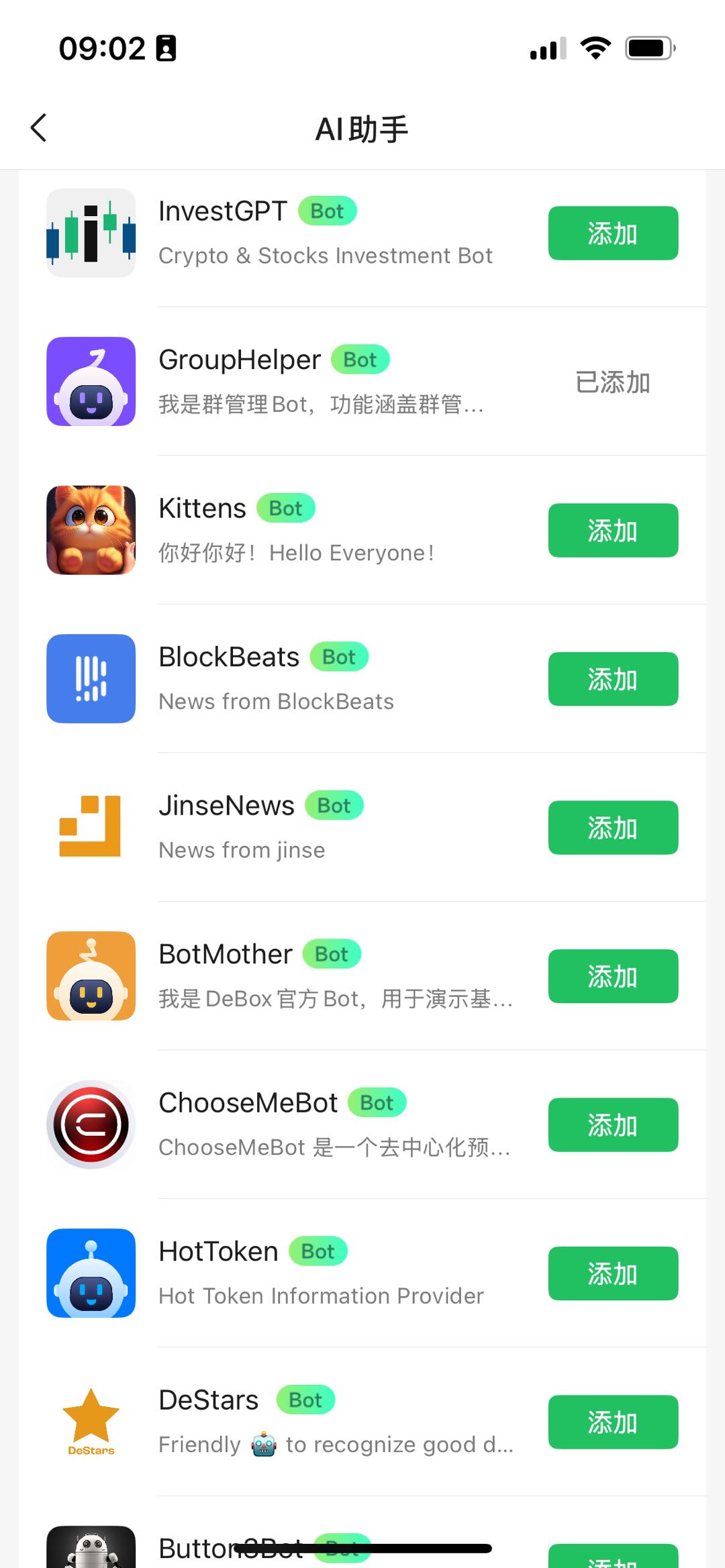
You can open BotMother in 3 ways:
1. Deep link: `https://m.debox.pro/user/chat?id=u7ooqdjt&start=`
2. Address search: `0xda521900ac9dfeff8a8e692bb627ff8cd80a7b28`
3. DeBox AI assistant entry
Recommended sequence starts from AI assistant:
### 1.1 Find BotMother from AI assistant
### 1.2 Enter BotMother conversation entry
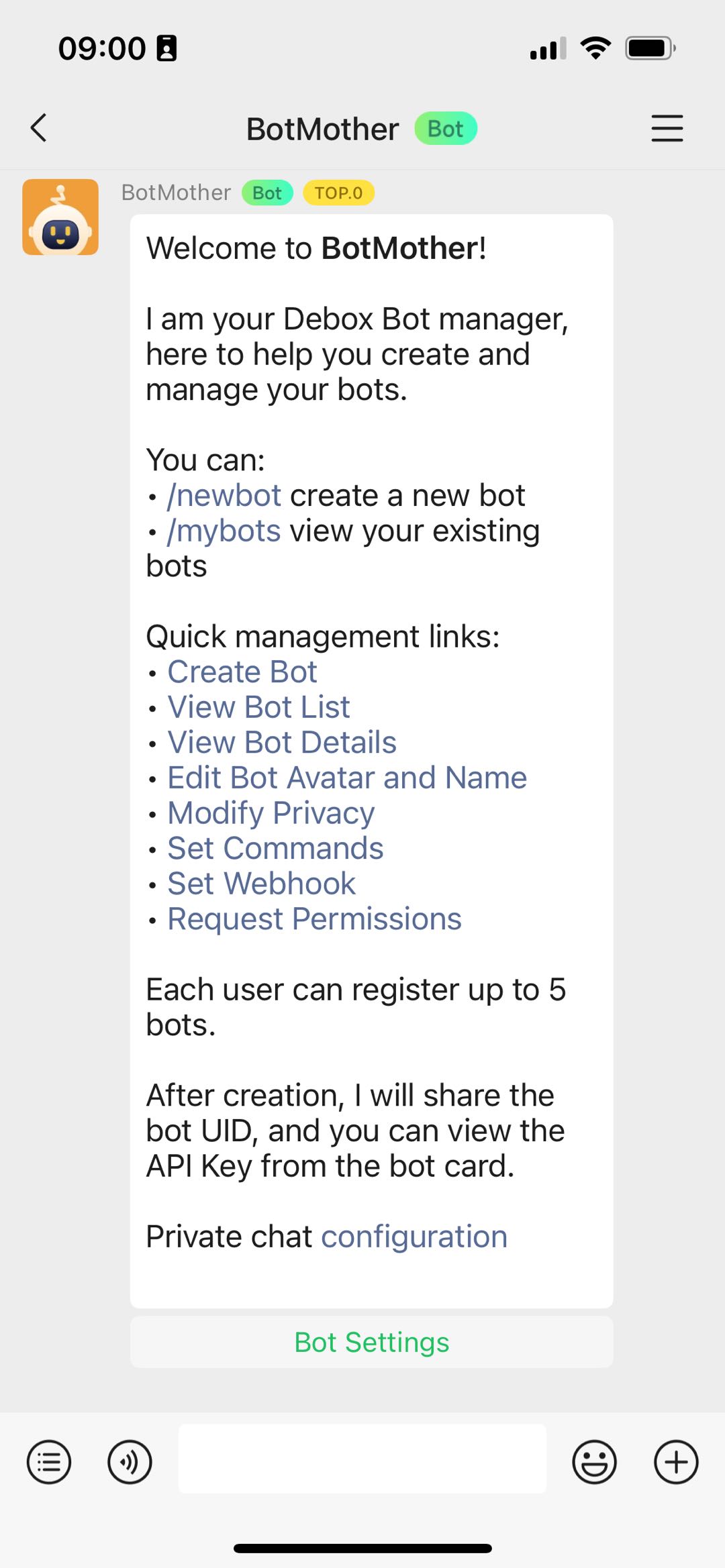
### 1.3 Check BotMother command menu
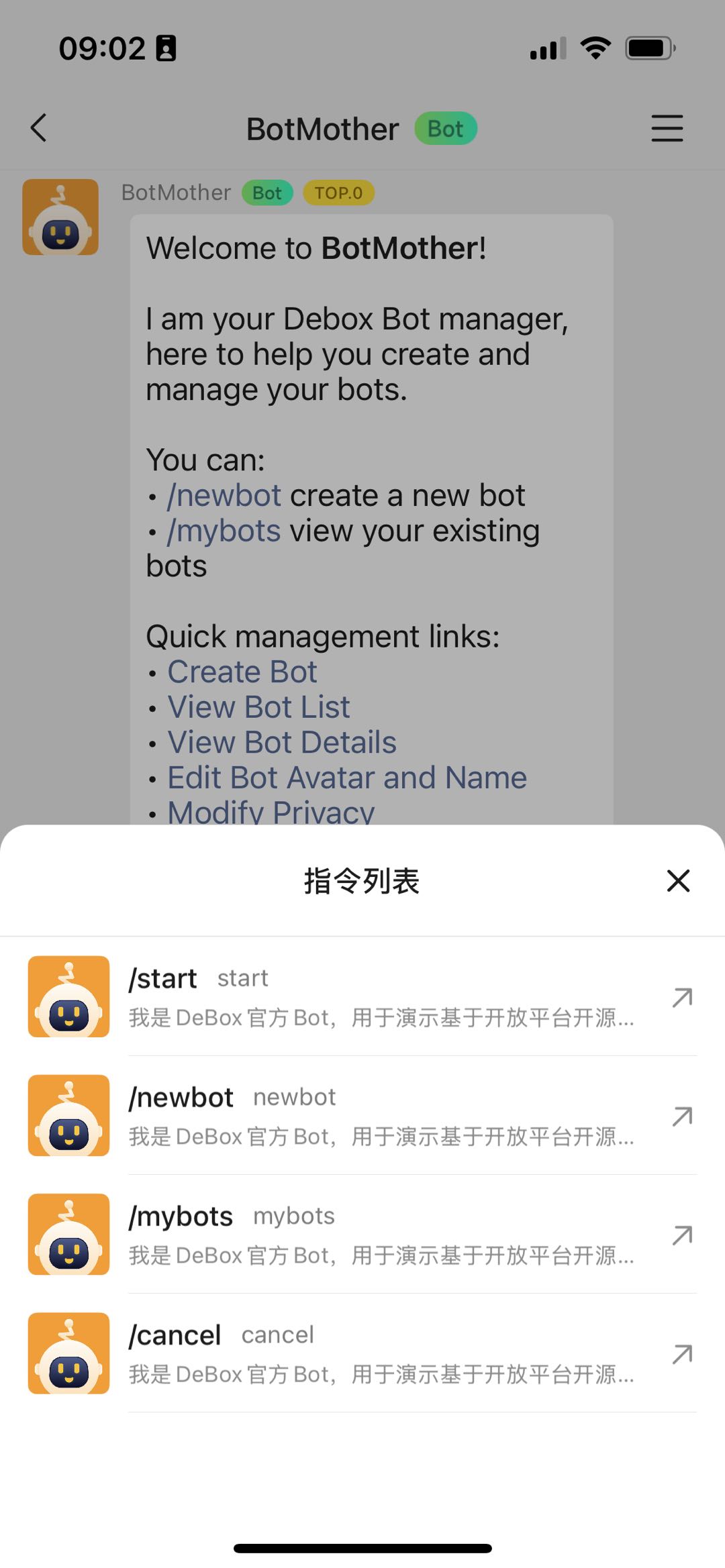
## 2. Create a bot with BotMother
Follow the instruction flow shown by BotMother. Typical flow:
1. Trigger bot creation command.
2. Set bot profile (name, avatar, description).
3. Complete creation and enter bot management list.
## 3. Manage and update bot settings
After creation, finish baseline settings first, then choose development mode.
### 3.1 Bot management home
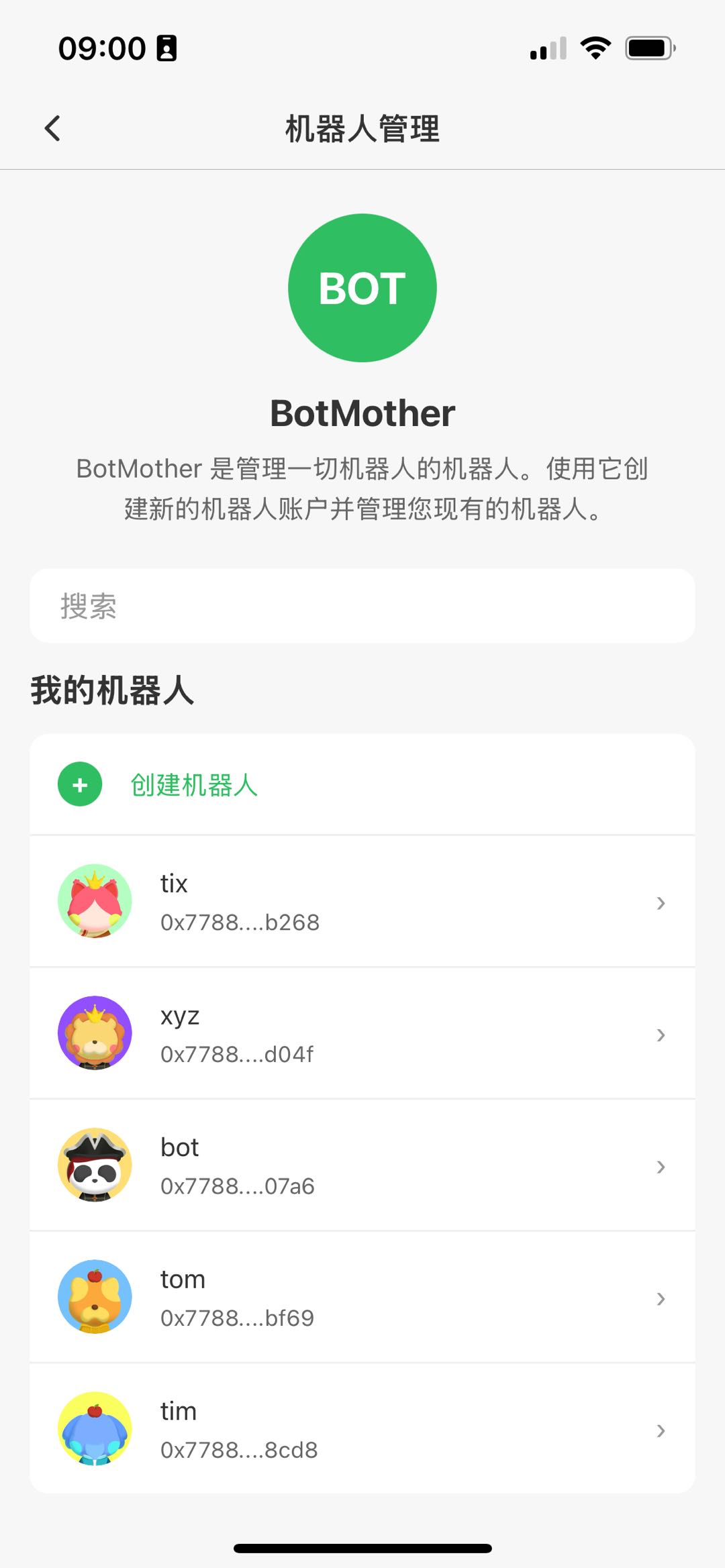
On this page you can:
- View all bots
- Enter a specific bot management page
- Add or remove bots
### 3.2 Single bot management page
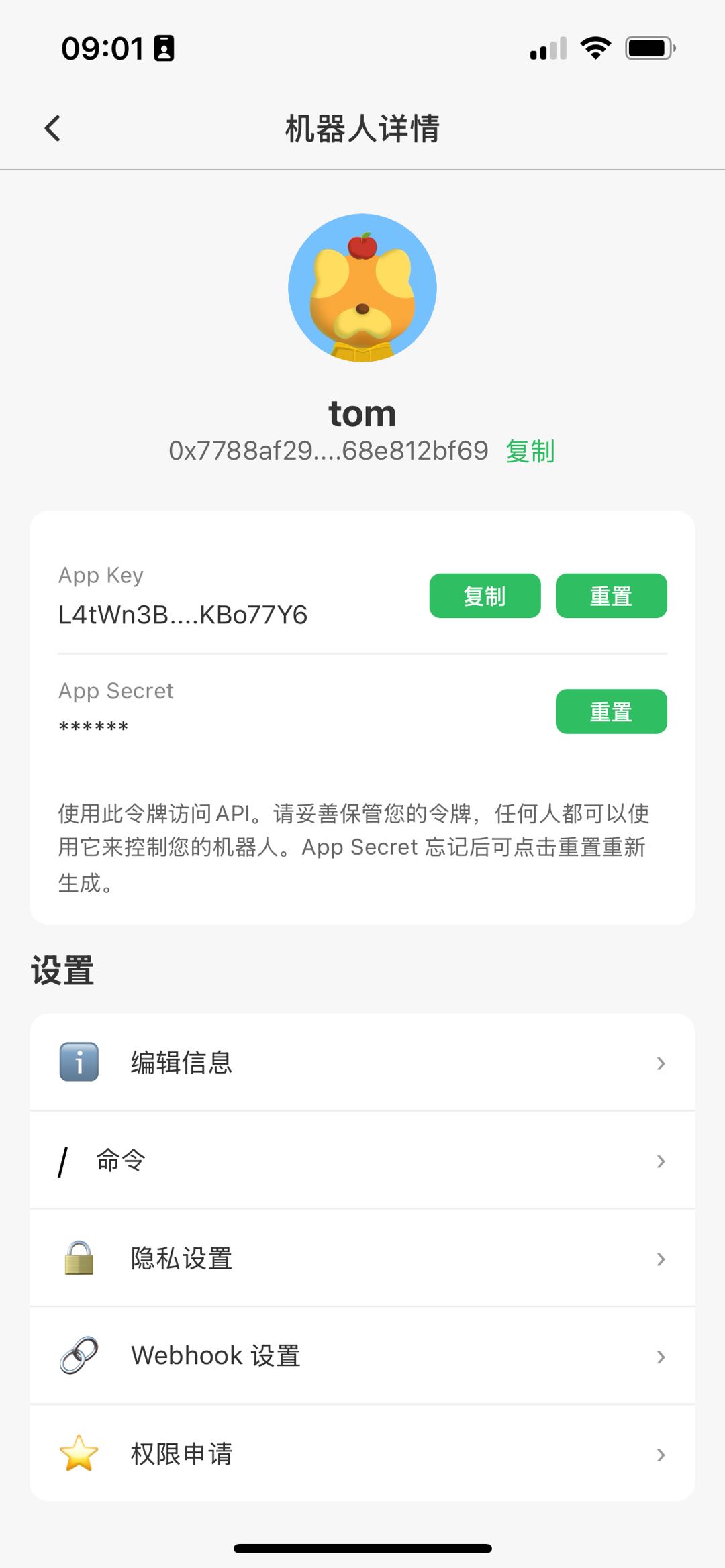
On this page you can configure:
- Bot profile (name, avatar, description)
- Credentials (`API Key`, and `App Secret` when needed)
- Webhook settings (`App Domain`, `Webhook URL`)
## 4. Choose one receiving mode (required)
DeBox Bot supports two receive modes:
- Webhook mode (platform pushes to your service)
- Long polling mode (`getUpdates` pull)
They are strictly mutually exclusive:
- If webhook is configured, webhook is the active receive path.
- Long polling will receive none or near-none updates in that state.
- To switch back to long polling, clear webhook config first.
## 5. Webhook mode
Minimal setup steps:
1. Configure `App Domain` in bot settings.
2. Configure `Webhook URL` (public HTTPS endpoint).
3. Implement callback API and validate `X-API-KEY == Webhook Key`.
4. Handle payload and send replies with OpenAPI.
References:
- [DeBox Bot Go SDK Webhook](/GO-SDK-Webhook)
- [DeBox Developer OpenAPI](/ApiOnePage)
## 6. Long polling mode
Minimal setup steps:
1. Ensure webhook is not configured.
2. Initialize bot with `API Key` + `API Secret` via SDK.
3. Enable listener and process updates from `GetUpdates/GetUpdatesChan`.
4. Send replies using SDK/OpenAPI.
## 7. SDK options (3 official SDKs)
1. Go SDK:
- Doc: [DeBox Bot Go SDK](/GO-SDK)
- Best for high-concurrency backend services.
2. Nodejs SDK:
- Doc: [DeBox Bot Nodejs SDK](/NODE-SDK)
- Best for JS/TS stacks and rapid iteration.
3. Python SDK:
- Doc: [DeBox Bot Python SDK](/PYTHON-SDK)
- Best for AI workflows, scripts, and data workflows.
## 8. API reference boundary
SDK docs focus on usage patterns, while OpenAPI is the source of truth for field constraints and response contracts.
Use together:
- [DeBox Developer OpenAPI](/ApiOnePage)
- [Developer FAQ / Troubleshooting](/APIQA)
## 9. Recommended implementation path
1. Create bot in BotMother and complete baseline settings.
2. Start with webhook for small-scale integration testing.
3. Select Go/Nodejs/Python SDK by team stack.
4. Validate all request/response details against OpenAPI.
---
## DeBox Developer OpenAPI
## Endpoint Index (Ordered)
1. [`POST /openapi/bot/sendMessage`](#api-bot-sendmessage)
2. [`POST /openapi/bot/sendMessageToFans`](#api-bot-sendmessagetofans)
3. [`POST /openapi/bot/editMessage`](#api-bot-editmessage)
4. [`POST /openapi/bot/getMe`](#api-bot-getme)
5. [`POST /openapi/bot/getUpdates`](#api-bot-getupdates)
6. [`GET /openapi/group/info`](#api-group-info)
7. [`GET /openapi/group/is_join`](#api-group-is-join)
8. [`POST /openapi/group/admin/dao_member`](#api-group-admin-dao-member)
9. [`POST /openapi/group/admin/kick_member`](#api-group-admin-kick-member)
10. [`POST /openapi/group/admin/message/recall`](#api-group-admin-message-recall)
11. [`GET /openapi/user/info`](#api-user-info)
12. [`GET /openapi/user/is_follow`](#api-user-is-follow)
13. [`GET /openapi/token/info`](#api-token-info)
14. [`GET /openapi/box/info`](#api-box-info)
## Base URL
`https://open.debox.pro`
## Authentication
All endpoints except `GET /openapi/box/info` require:
```http
X-API-KEY:
```
## Response Envelopes
### Standard envelope
```json
{
"code": 1,
"success": true,
"data": {}
}
```
### Bot envelope
```json
{
"ok": true,
"success": true,
"result": {}
}
```
---
## Global Parameter Ranges
- `chat_type`: `group` | `private`
- `chat_id`:
- when `chat_type=group`: group `gid`
- when `chat_type=private`: user `user_id` (invite code)
- `content` is the primary field
- max length for text-like modes (`text`/`richtext`/`Markdown`/`MarkdownV2`/`HTML`): 5000 chars
- default `parse_mode`: `richtext`
- `parse_mode` enum:
- `richtext` (default)
- `text`
- `Markdown`
- `MarkdownV2`
- `HTML`
- `image`
- `video`
- `file`
### How to fill `content` (critical)
- `parse_mode=richtext`: normal text/rich text string (default).
- `parse_mode=text`: plain text only (no Markdown/HTML parsing).
- `parse_mode=Markdown`: Markdown content.
- `parse_mode=MarkdownV2`: MarkdownV2 content (escape special chars as required).
- `parse_mode=HTML`: HTML fragment (e.g. `Hello`).
- `parse_mode=image`: set `content` to a public image URL (e.g. `https://cdn.example.com/a.png`).
- `parse_mode=video`: set `content` to a public video URL (e.g. `https://cdn.example.com/a.mp4`).
- `parse_mode=file`: set `content` to a public file URL (e.g. `https://cdn.example.com/a.pdf`).
### Minimal `reply_markup` / `user_action_markup` sample
```json
{
"inline_keyboard": [
[
{ "text": "View detail", "url": "https://docs.debox.pro/ApiOnePage" },
{ "text": "Callback button", "callback_data": "detail" }
]
]
}
```
### `mention_type` / `mention_ids` practical guidance
- Recommended mainly when `parse_mode=text`.
- For rich text modes (`richtext/Markdown/MarkdownV2/HTML`), prefer writing `@` directly in `content` and avoid `mention_*`.
- If no mention behavior is needed, omit both fields.
---
## 1. POST `/openapi/bot/sendMessage` {#api-bot-sendmessage}
### Curl Example
```bash
curl -X POST "https://open.debox.pro/openapi/bot/sendMessage" \
-H "Content-Type: application/json" \
-H "X-API-KEY: YOUR_APP_KEY" \
-d '{"chat_id":"cc0onr82","chat_type":"group","content":"hello","parse_mode":"richtext"}'
```
### Request params (Body, JSON)
- `chat_id` string, required
- `chat_type` string, required, enum: `group` | `private`
- `content` string, required
- `parse_mode` string, optional, default `richtext`
- `message_id` string, optional
- `mention_type` int, optional
- `mention_ids` string[], optional
- `reply_markup` object, optional
- `user_action_markup` object, optional
### Success response example
```json
{
"ok": true,
"success": true,
"result": {
"message_id": "01JYXXXX",
"text": "Hello from DeBox",
"parse_mode": "richtext"
}
}
```
### Error response example
```json
{
"ok": false,
"success": false,
"message": "message can't be empty"
}
```
---
## 2. POST `/openapi/bot/sendMessageToFans` {#api-bot-sendmessagetofans}
### Curl Example
```bash
curl -X POST "https://open.debox.pro/openapi/bot/sendMessageToFans" \
-H "Content-Type: application/json" \
-H "X-API-KEY: YOUR_APP_KEY" \
-d '{"chat_id":"cc0onr82","chat_type":"group","content":"broadcast","parse_mode":"richtext"}'
```
### Request params (Body, JSON)
- `chat_id` string, required
- `chat_type` string, required, enum: `group` | `private`
- `content` string, required
- `parse_mode` string, optional, default `richtext`
Constraint: `content` max 2000 bytes.
### Success response example
```json
{
"ok": true,
"success": true,
"result": true
}
```
### Error response example
```json
{
"ok": false,
"success": false,
"message": "message must be less than 2000 bytes"
}
```
---
## 3. POST `/openapi/bot/editMessage` {#api-bot-editmessage}
### Curl Example
```bash
curl -X POST "https://open.debox.pro/openapi/bot/editMessage" \
-H "Content-Type: application/json" \
-H "X-API-KEY: YOUR_APP_KEY" \
-d '{"chat_id":"cc0onr82","chat_type":"group","message_id":"01JYXXXX","content":"edited","parse_mode":"richtext"}'
```
### Request params (Body, JSON)
- `chat_id` string, required
- `chat_type` string, required, enum: `group` | `private`
- `message_id` string, required
- `content` string, required
- `parse_mode` string, optional, default `richtext`
### Success response example
```json
{
"ok": true,
"success": true,
"result": true
}
```
### Error response example
```json
{
"ok": false,
"success": false,
"message": "EditMessageText param Group Id is error"
}
```
---
## 4. POST `/openapi/bot/getMe` {#api-bot-getme}
### Curl Example
```bash
curl -X POST "https://open.debox.pro/openapi/bot/getMe" \
-H "X-API-KEY: YOUR_APP_KEY"
```
### Request params
None.
### Success response example
```json
{
"ok": true,
"success": true,
"result": {
"name": "DeBox Bot",
"address": "0x...",
"pic": "https://...",
"user_id": "u1",
"level": 3,
"level_icon": "https://.../icon/level/v3.png"
}
}
```
### Error response example
```json
{
"ok": false,
"success": false,
"message": "invalid param"
}
```
---
## 5. POST `/openapi/bot/getUpdates` {#api-bot-getupdates}
### Curl Example
```bash
curl -X POST "https://open.debox.pro/openapi/bot/getUpdates" \
-H "Content-Type: application/json" \
-H "X-API-KEY: YOUR_APP_KEY" \
-d '{"timeout":30}'
```
### Request params (Body, JSON)
- `timeout` int, optional, range `1~60`, default `30`
Note: if webhook URL is configured in platform console, webhook becomes the only effective receive path. In that case this endpoint usually returns none or near-none updates.
### Success response example (with updates)
```json
{
"ok": true,
"success": true,
"result": [
{
"id": 123,
"message": {
"message_id": "01JYXXXX",
"from": {
"user_id": "u1",
"name": "Alice",
"address": "0x..."
},
"chat": {
"id": "cc0onr82",
"type": "group"
},
"text": "Ping",
"parse_mode": "richtext"
}
}
]
}
```
### Success response example (timeout, no updates)
```json
{
"ok": true,
"success": true,
"result": []
}
```
### Error response example
```json
{
"ok": false,
"success": false,
"message": "Invalid timeout value"
}
```
---
## 6. GET `/openapi/group/info` {#api-group-info}
### Curl Example
```bash
curl "https://open.debox.pro/openapi/group/info?gid=cc0onr82" \
-H "X-API-KEY: YOUR_APP_KEY"
```
### Query params
- `gid` string, required
### Success response example
```json
{
"code": 1,
"success": true,
"data": {
"is_charge": false,
"subchannel_number": 2,
"group_name": "DeBox Dev",
"gid": "cc0onr82",
"group_number": 345,
"group_pic": "https://...",
"create_time": "2026-05-14 14:00:00",
"maximum": "Unlimited",
"mod": ["Alice", "Bob"],
"mod_info": [
{
"name": "Alice",
"address": "0x...",
"pic": "https://...",
"user_id": "u1"
}
]
}
}
```
### Error response example
```json
{
"code": -3001,
"success": false,
"message": "No such group"
}
```
---
## 7. GET `/openapi/group/is_join` {#api-group-is-join}
### Curl Example
```bash
curl "https://open.debox.pro/openapi/group/is_join?gid=cc0onr82&walletAddress=0x1234567890abcdef1234567890abcdef12345678" \
-H "X-API-KEY: YOUR_APP_KEY"
```
### Query params
- `gid` string, required
- `walletAddress` string, required (EVM address)
### Success response example
```json
{
"code": 1,
"data": true
}
```
### Error response example
```json
{
"error": "Bad Request",
"code": 401,
"message": "Param error"
}
```
---
## 8. POST `/openapi/group/admin/dao_member` {#api-group-admin-dao-member}
### Curl Example
```bash
curl -X POST "https://open.debox.pro/openapi/group/admin/dao_member" \
-H "Content-Type: application/json" \
-H "X-API-KEY: YOUR_APP_KEY" \
-H "nonce: RANDOM_NONCE" \
-H "timestamp: 1715500000" \
-H "signature: SHA1(app_secret+nonce+timestamp)" \
-d '{"gid":"cc0onr82","page":1,"size":20}'
```
### Extra headers (required)
- `nonce` string
- `timestamp` string
- `signature` string
Signature algorithm: `sha1(app_secret + nonce + timestamp)`.
### Request params (Body, JSON)
- `gid` string, required, length `1~8`
- `page` int, optional, if `<=0` then treated as `1`
- `size` int, optional, default `50`, max `50`
### Success response example
```json
{
"code": 1,
"success": true,
"data": [
{
"user_id": "u1",
"name": "Alice",
"pic": "https://...",
"address": "0x...",
"signature": "builder"
}
]
}
```
### Error response example
```json
{
"code": -4017,
"success": false,
"message": "permission denied"
}
```
---
## 9. POST `/openapi/group/admin/kick_member` {#api-group-admin-kick-member}
### Purpose
Remove one or more members from a DeBox group.
The bot account bound to the current `X-API-KEY` must already be in the target group and must have moderator or builder permission in that group.
### Curl Example
```bash
curl -X POST "https://open.debox.pro/openapi/group/admin/kick_member" \
-H "Content-Type: application/json" \
-H "X-API-KEY: YOUR_APP_KEY" \
-H "nonce: RANDOM_NONCE" \
-H "timestamp: 1715500000" \
-H "signature: SHA1(app_secret+nonce+timestamp)" \
-d '{
"gid":"cc0onr82",
"user_ids":["u1","u2"]
}'
```
### Extra headers (required)
- `nonce` string
- `timestamp` string
- `signature` string
Signature algorithm: `sha1(app_secret + nonce + timestamp)`.
### Permission requirements
- `X-API-KEY` must be valid.
- The API key must be bound to an existing DeBox bot account.
- The bound bot must be a moderator or builder of the target group.
### Request params (Body, JSON)
- `gid` string, required, target group ID, length `1~8`
- `user_ids` string array, required, list of DeBox `user_id` values to remove
- `user_ids` maximum size: `20` per request
### Validation and execution rules
- Empty `user_ids` is rejected.
- Empty string items inside `user_ids` are rejected.
- Duplicate `user_id` values are de-duplicated before execution.
- If any provided `user_id` cannot be resolved to a valid user, the request fails.
### Success response example
```json
{
"code": 1,
"success": true,
"message": "success",
"data": true
}
```
### Error response examples
```json
{
"code": -2004,
"success": false,
"message": "uid size must be less than or equal to 20",
"data": null
}
```
```json
{
"code": -4017,
"success": false,
"message": "permission denied",
"data": null
}
```
---
## 10. POST `/openapi/group/admin/message/recall` {#api-group-admin-message-recall}
### Purpose
Recall a group message through an administrator action.
After recall, the message will be displayed as the following group notification:
`MOD {operator_name} 撤回了 {sender_name}的消息`
### Curl Example
```bash
curl -X POST "https://open.debox.pro/openapi/group/admin/message/recall" \
-H "Content-Type: application/json" \
-H "X-API-KEY: YOUR_APP_KEY" \
-H "nonce: RANDOM_NONCE" \
-H "timestamp: 1715500000" \
-H "signature: SHA1(app_secret+nonce+timestamp)" \
-d '{
"gid":"cc0onr82",
"user_id":"u1",
"message_id":"01HXYZABCDEF1234567890"
}'
```
### Extra headers (required)
- `nonce` string
- `timestamp` string
- `signature` string
Signature algorithm: `sha1(app_secret + nonce + timestamp)`.
### Permission requirements
- `X-API-KEY` must be valid.
- The API key must be bound to an existing DeBox bot account.
- The bound bot must be a moderator or builder of the target group.
### Request params (Body, JSON)
- `gid` string, required, target group ID, length `1~8`
- `user_id` string, required, DeBox `user_id` of the original sender
- `message_id` string, required, message ID to recall
### Important notes
- `user_id` must resolve to an existing DeBox user.
- `message_id` must identify a message in the target group that can be modified by the platform.
- The operator name in the recall notice prefers the bot display name and falls back to the bot `user_id`.
- The original sender name follows the same fallback rule.
### Success response example
```json
{
"code": 1,
"success": true,
"message": "success",
"data": true
}
```
### Error response examples
```json
{
"code": -2004,
"success": false,
"message": "message_id is required",
"data": null
}
```
```json
{
"code": -2000,
"success": false,
"message": "recall message failed",
"data": null
}
```
---
## 11. GET `/openapi/user/info` {#api-user-info}
### Curl Example
```bash
curl "https://open.debox.pro/openapi/user/info?user_id=u1" \
-H "X-API-KEY: YOUR_APP_KEY"
```
### Query params
- `user_id` string, optional
- `address` string, optional (EVM address)
- at least one is required
### Success response example
```json
{
"code": 1,
"success": true,
"data": {
"user_id": "u1",
"name": "Alice",
"address": "0x...",
"pic": "https://...",
"signature": "gm builder"
}
}
```
### Error response example
```json
{
"code": -2004,
"success": false,
"message": "invalid param"
}
```
---
## 12. GET `/openapi/user/is_follow` {#api-user-is-follow}
### Curl Example
```bash
curl "https://open.debox.pro/openapi/user/is_follow?walletAddress=0x1234567890abcdef1234567890abcdef12345678&followAddress=0xabcdefabcdefabcdefabcdefabcdefabcdefabcd" \
-H "X-API-KEY: YOUR_APP_KEY"
```
### Query params
- `walletAddress` string, required (EVM address)
- `followAddress` string, required (EVM address)
### Success response example
```json
{
"code": 1,
"data": true
}
```
### Error response example
```json
{
"error": "Bad Request",
"code": 401,
"message": "Please input the wallet address correctly"
}
```
---
## 13. GET `/openapi/token/info` {#api-token-info}
### Curl Example
```bash
curl "https://open.debox.pro/openapi/token/info?contract_address=0x55d398326f99059fF775485246999027B3197955&chain_id=56" \
-H "X-API-KEY: YOUR_APP_KEY"
```
### Query params
- `contract_address` string, required
- `chain_id` int, optional; missing/negative is treated as `0`
### Success response example
```json
{
"code": 1,
"success": true,
"data": {
"chain_id": 56,
"token": "0x55d398326f99059fF775485246999027B3197955",
"decimal": 18,
"name": "Tether USD",
"symbol": "USDT",
"logo_url": "https://..."
}
}
```
### Error response example
```json
{
"code": -2004,
"success": false,
"message": "contract_address must be a valid contract address"
}
```
---
## 14. GET `/openapi/box/info` {#api-box-info}
### Curl Example
```bash
curl "https://open.debox.pro/openapi/box/info"
```
Public endpoint, no API key required.
### Query params
None.
### Success response example
```json
{
"code": 1,
"success": true,
"data": {
"max_supply": "1000000000",
"burned": "...",
"supply": "...",
"locked": "...",
"address": "0x...",
"symbol": "BOX",
"chainId": 1,
"icon": "https://...",
"stake": "..."
}
}
```
---
## DeBox Bot Go SDK
# DeBox Bot Go SDK Guide
Source repository:
- [debox-pro/debox-chat-go-sdk](https://github.com/debox-pro/debox-chat-go-sdk)
## 1. SDK capabilities
The SDK provides:
- Bot init: `NewBotAPI(apiKey, apiSecret)`
- Message sending: `bot.Send(...)`
- Long polling updates: `GetUpdates` / `GetUpdatesChan`
- Inline keyboard callbacks: `InlineKeyboardMarkup` + `CallbackQuery`
- Message editing: `NewEditMessageText` + `bot.Send(...)`
Webhook is split into a standalone guide:
- [DeBox Bot Go SDK Webhook](/GO-SDK-Webhook)
## 2. Receiving mode notes
This document focuses on Long Polling.
If you already configured webhook in platform console, polling may receive little or no data. For webhook deployment, read:
- [DeBox Bot Go SDK Webhook](/GO-SDK-Webhook)
---
## 3. Long polling usage (detailed SDK workflow)
### 3.1 Install
```bash
go get github.com/debox-pro/debox-chat-go-sdk
```
### 3.2 Credentials
Get from DeBox Open Platform:
- `API_KEY` (required)
- `API_SECRET` (recommended)
### 3.3 Init + first message
```go
package main
import (
"log"
boxbotapi "github.com/debox-pro/debox-chat-go-sdk/boxbotapi"
)
func main() {
bot, err := boxbotapi.NewBotAPI("YOUR_APP_KEY", "YOUR_API_SECRET")
if err != nil {
log.Fatalf("init bot failed: %v", err)
}
msg := boxbotapi.NewMessage("cc0onr82", "group", "Hello from Go SDK")
msg.ParseMode = boxbotapi.ModeRichText
sent, err := bot.Send(msg)
if err != nil {
log.Fatalf("send failed: %v", err)
}
log.Printf("sent message_id=%s", sent.MessageID)
}
```
### 3.4 Long polling via `GetUpdatesChan` (recommended)
```go
package main
import (
"context"
"log"
boxbotapi "github.com/debox-pro/debox-chat-go-sdk/boxbotapi"
)
func main() {
bot, err := boxbotapi.NewBotAPI("YOUR_APP_KEY", "YOUR_API_SECRET")
if err != nil {
log.Fatal(err)
}
boxbotapi.MessageListener = true
cfg := boxbotapi.NewUpdate(0)
cfg.Timeout = 30
ctx := context.Background()
updates := bot.GetUpdatesChan(cfg)
for {
select {
case <-ctx.Done():
bot.StopReceivingUpdates()
return
case upd := <-updates:
if upd.Message != nil {
log.Printf("from=%s chat=%s text=%s", upd.Message.From.UserId, upd.Message.Chat.ID, upd.Message.Text)
}
if upd.CallbackQuery != nil {
log.Printf("callback=%s", upd.CallbackQuery.Data)
}
}
}
}
```
### 3.5 Manual polling via `GetUpdates`
```go
cfg := boxbotapi.NewUpdate(0)
cfg.Timeout = 30
updates, err := bot.GetUpdates(cfg)
if err != nil {
log.Printf("get updates failed: %v", err)
return
}
for _, upd := range updates {
if upd.Message != nil {
log.Println(upd.Message.Text)
}
}
```
### 3.6 Send multiple message types
```go
m1 := boxbotapi.NewMessage(chatID, chatType, "*bold* _italic_")
m1.ParseMode = boxbotapi.ModeMarkdownV2
_, _ = bot.Send(m1)
m2 := boxbotapi.NewMessage(chatID, chatType, "Hellodocs")
m2.ParseMode = boxbotapi.ModeHTML
_, _ = bot.Send(m2)
m3 := boxbotapi.NewMessage(chatID, chatType, "https://example.com/a.png")
m3.ParseMode = boxbotapi.ModeImage
_, _ = bot.Send(m3)
```
Available parse modes:
- `boxbotapi.ModeRichText`
- `boxbotapi.ModeText`
- `boxbotapi.ModeMarkdown`
- `boxbotapi.ModeMarkdownV2`
- `boxbotapi.ModeHTML`
- `boxbotapi.ModeImage`
- `boxbotapi.ModeVideo`
- `boxbotapi.ModeFile`
`content` rules by `parse_mode`:
- `richtext` (default): use normal text/rich text string, e.g. `Hello and welcome to DeBox Bot`.
- `text`: use plain text only (no Markdown/HTML rendering), e.g. `plain text only`.
- `Markdown`: use Markdown string, e.g. `**bold**`.
- `MarkdownV2`: use MarkdownV2 string with required escaping, e.g. `\\*bold\\*`.
- `HTML`: use HTML fragment string, e.g. `Hello`.
- `image`: set `content` to a publicly reachable image URL, e.g. `https://cdn.example.com/a.png`.
- `video`: set `content` to a publicly reachable video URL, e.g. `https://cdn.example.com/demo.mp4`.
- `file`: set `content` to a publicly reachable file URL, e.g. `https://cdn.example.com/spec.pdf`.
- Text modes (`richtext/text/Markdown/MarkdownV2/HTML`) support up to 5000 characters.
### 3.7 Inline keyboard + callback
```go
markup := boxbotapi.NewInlineKeyboardMarkup(
boxbotapi.NewInlineKeyboardRow(
boxbotapi.NewInlineKeyboardButtonData("Details", "detail"),
boxbotapi.NewInlineKeyboardButtonURL("Open site", "https://debox.pro"),
),
)
msg := boxbotapi.NewMessage("cc0onr82", "group", "Pick one")
msg.ParseMode = boxbotapi.ModeRichText
msg.ReplyMarkup = markup
_, _ = bot.Send(msg)
```
Callback handler:
```go
if upd.CallbackQuery != nil {
data := upd.CallbackQuery.Data
_ = data
}
```
### 3.8 Edit message
```go
edit := boxbotapi.NewEditMessageText("cc0onr82", "group", "MESSAGE_ID", "edited text")
edit.ParseMode = boxbotapi.ModeRichText
_, err := bot.Send(edit)
if err != nil {
log.Printf("edit failed: %v", err)
}
```
---
## DeBox Bot Nodejs SDK
# DeBox Bot Nodejs SDK Guide
Source repository:
- [debox-pro/debox-chat-nodejs-sdk](https://github.com/debox-pro/debox-chat-nodejs-sdk)
## 1. SDK capabilities
`debox-chat-nodejs-sdk` provides:
- Bot initialization: `NewBotAPI(apiKey, apiSecret)`
- Send message: `bot.Send(...)`
- Long polling updates: `GetUpdates` / `GetUpdatesChan`
- Inline keyboard and callback handling
- Edit message: `NewEditMessageText(...)` / `NewEditMessageTextAndMarkup(...)`
## 2. Receiving mode notes
This document focuses on Long Polling mode.
Webhook and Long Polling are strictly mutually exclusive:
- If webhook is configured in platform console, webhook becomes the active receiving path.
- To receive updates via polling, clear webhook config first.
Webhook usage is covered separately:
- [DeBox Bot Go SDK Webhook](/GO-SDK-Webhook)
## 3. Install and init
### 3.1 Install
```bash
npm install github:debox-pro/debox-chat-nodejs-sdk
```
Or clone and install locally:
```bash
git clone https://github.com/debox-pro/debox-chat-nodejs-sdk.git
cd debox-chat-nodejs-sdk
npm install
```
### 3.2 Credentials
Get from DeBox Open Platform:
- `API_KEY` (required)
- `API_SECRET` (recommended)
Set environment variables:
```bash
export DEBOX_BOT_API_KEY="YOUR_APP_KEY"
export DEBOX_BOT_API_SECRET="YOUR_API_SECRET"
```
### 3.3 First message
```js
const boxbotapi = require("./boxbotapi");
async function main() {
const bot = await boxbotapi.NewBotAPI(
process.env.DEBOX_BOT_API_KEY,
process.env.DEBOX_BOT_API_SECRET || "",
);
const msg = boxbotapi.NewMessage("cc0onr82", "group", "Hello from Nodejs SDK");
msg.ParseMode = boxbotapi.ModeRichText;
const sent = await bot.Send(msg);
console.log("sent message_id=", sent.MessageID);
}
main().catch(console.error);
```
## 4. Receive messages with Long Polling
```js
const boxbotapi = require("./boxbotapi");
async function run() {
boxbotapi.Debug = false;
boxbotapi.MessageListener = true;
const bot = await boxbotapi.NewBotAPI(
process.env.DEBOX_BOT_API_KEY,
process.env.DEBOX_BOT_API_SECRET || "",
);
const u = boxbotapi.NewUpdate(0);
u.Timeout = 60;
for await (const update of bot.GetUpdatesChan(u)) {
if (update.Message) {
const text = update.Message.Text || "";
console.log("message:", text);
const reply = boxbotapi.NewMessage(
update.Message.Chat.ID,
update.Message.Chat.Type,
`Received: ${text}`,
);
reply.ParseMode = boxbotapi.ModeRichText;
await bot.Send(reply);
}
if (update.CallbackQuery) {
console.log("callback:", update.CallbackQuery.Data);
}
}
}
run().catch(console.error);
```
## 5. Parse mode and content rules
SDK constants:
- `boxbotapi.ModeRichText`
- `boxbotapi.ModeMarkdown`
- `boxbotapi.ModeMarkdownV2`
- `boxbotapi.ModeHTML`
- `boxbotapi.ModeImage`
- `boxbotapi.ModeVideo`
- `boxbotapi.ModeFile`
`content` rules:
- `richtext` / `Markdown` / `MarkdownV2` / `HTML`: send text content.
- `image` / `video` / `file`: `content` must be a publicly reachable URL.
- Text content max length is 5000 characters.
## 6. Inline keyboard + callback
```js
const markup = boxbotapi.NewInlineKeyboardMarkup(
boxbotapi.NewInlineKeyboardRow(
boxbotapi.NewInlineKeyboardButtonData("Details", "detail"),
boxbotapi.NewInlineKeyboardButtonURL("Open docs", "https://docs.debox.pro"),
),
);
const msg = boxbotapi.NewMessage("cc0onr82", "group", "Choose one");
msg.ParseMode = boxbotapi.ModeRichText;
msg.ReplyMarkup = markup;
await bot.Send(msg);
```
Handle callback:
```js
if (update.CallbackQuery) {
const data = update.CallbackQuery.Data;
const chat = update.CallbackQuery.Message.Chat;
const messageId = update.CallbackQuery.Message.MessageID;
const edit = boxbotapi.NewEditMessageText(chat.ID, chat.Type, messageId, `clicked: ${data}`);
edit.ParseMode = boxbotapi.ModeRichText;
await bot.Send(edit);
}
```
## 7. Chat routing fields
When sending/editing messages:
- `chat_type=group` -> `chat_id` must be group `gid`
- `chat_type=private` -> `chat_id` must be user `user_id` (invite code)
## 8. Common issues
1. No updates received:
- Check webhook status first (mutually exclusive with polling).
- Ensure `boxbotapi.MessageListener = true`.
2. Request failed with auth error:
- Check `API_KEY/API_SECRET` and signature-related headers.
3. Media send failed:
- Ensure URL is public and directly accessible.
---
## DeBox Bot Python SDK
# DeBox Bot Python SDK Guide
Source repository:
- [debox-pro/debox-chat-python-sdk](https://github.com/debox-pro/debox-chat-python-sdk)
## 1. SDK capabilities
`debox-chat-python-sdk` provides:
- Bot initialization: `NewBotAPI(api_key, api_secret)`
- Message sending: `bot.Send(...)`
- Long polling updates: `GetUpdates` / `GetUpdatesChan`
- Inline keyboard + callback handling
- Message editing: `NewEditMessageText(...)` / `NewEditMessageTextAndMarkup(...)`
## 2. Receiving mode notes
This document covers Long Polling mode.
Webhook and Long Polling are strictly mutually exclusive:
- If webhook is configured in platform console, messages are delivered to webhook.
- To use polling, clear webhook configuration first.
Webhook guide:
- [DeBox Bot Go SDK Webhook](/GO-SDK-Webhook)
## 3. Install and init
### 3.1 Install
```bash
pip install git+https://github.com/debox-pro/debox-chat-python-sdk.git
```
Or clone and install locally:
```bash
git clone https://github.com/debox-pro/debox-chat-python-sdk.git
cd debox-chat-python-sdk
pip install -e .
```
### 3.2 Credentials
Get from DeBox Open Platform:
- `API_KEY` (required)
- `API_SECRET` (recommended)
```bash
export DEBOX_BOT_API_KEY="YOUR_APP_KEY"
export DEBOX_BOT_API_SECRET="YOUR_API_SECRET"
```
### 3.3 First message
```python
import os
import boxbotapi
bot = boxbotapi.NewBotAPI(
os.getenv("DEBOX_BOT_API_KEY", ""),
os.getenv("DEBOX_BOT_API_SECRET", ""),
)
msg = boxbotapi.NewMessage("cc0onr82", "group", "Hello from Python SDK")
msg.ParseMode = boxbotapi.ModeRichText
sent = bot.Send(msg)
print("sent message_id=", sent.MessageID)
```
## 4. Receive messages with Long Polling
```python
import os
import boxbotapi
from boxbotapi import configs as cfg
cfg.Debug = False
cfg.MessageListener = True
bot = boxbotapi.NewBotAPI(
os.getenv("DEBOX_BOT_API_KEY", ""),
os.getenv("DEBOX_BOT_API_SECRET", ""),
)
u = boxbotapi.NewUpdate(0)
u.Timeout = 60
for update in bot.GetUpdatesChan(u):
if update.Message is not None:
text = update.Message.Text or ""
print("message:", text)
reply = boxbotapi.NewMessage(
update.Message.Chat.ID,
update.Message.Chat.Type,
f"Received: {text}",
)
reply.ParseMode = boxbotapi.ModeRichText
bot.Send(reply)
if update.CallbackQuery is not None:
print("callback:", update.CallbackQuery.Data)
```
## 5. Parse mode and content rules
SDK constants:
- `boxbotapi.ModeRichText`
- `boxbotapi.ModeMarkdown`
- `boxbotapi.ModeMarkdownV2`
- `boxbotapi.ModeHTML`
- `boxbotapi.ModeImage`
- `boxbotapi.ModeVideo`
- `boxbotapi.ModeFile`
`content` rules:
- `richtext` / `Markdown` / `MarkdownV2` / `HTML`: send text content.
- `image` / `video` / `file`: `content` must be a publicly reachable URL.
- Text content max length is 5000 characters.
## 6. Inline keyboard + callback
```python
markup = boxbotapi.NewInlineKeyboardMarkup(
boxbotapi.NewInlineKeyboardRow(
boxbotapi.NewInlineKeyboardButtonData("Details", "detail"),
boxbotapi.NewInlineKeyboardButtonURL("Open docs", "https://docs.debox.pro"),
)
)
msg = boxbotapi.NewMessage("cc0onr82", "group", "Choose one")
msg.ParseMode = boxbotapi.ModeRichText
msg.ReplyMarkup = markup
bot.Send(msg)
```
Handle callback and edit message:
```python
if update.CallbackQuery is not None:
data = update.CallbackQuery.Data
chat = update.CallbackQuery.Message.Chat
message_id = update.CallbackQuery.Message.MessageID
edit = boxbotapi.NewEditMessageText(chat.ID, chat.Type, message_id, f"clicked: {data}")
edit.ParseMode = boxbotapi.ModeRichText
bot.Send(edit)
```
## 7. Chat routing fields
When sending/editing messages:
- `chat_type=group` -> `chat_id` must be group `gid`
- `chat_type=private` -> `chat_id` must be user `user_id` (invite code)
## 8. Common issues
1. No updates received:
- Check webhook status first (mutually exclusive with polling).
- Ensure `cfg.MessageListener = True`.
2. Auth error:
- Verify `API_KEY/API_SECRET` and header signature path.
3. Media send failed:
- Ensure URL is public and directly accessible.
---
## DeBox Bot Go SDK Webhook
# DeBox Bot Go SDK Webhook Guide
Source repository:
- [debox-pro/debox-chat-go-sdk](https://github.com/debox-pro/debox-chat-go-sdk)
This document covers DeBox bot Webhook integration for Go services. It is intended for backend developers who need a production-grade callback receiver, payload parser, and reply flow.
## 1. Webhook vs Long Polling (strictly mutually exclusive)
There are two ways to receive bot updates:
1. Webhook: DeBox pushes updates to your server via `POST`.
2. Long Polling: your app pulls updates via `getUpdates`.
Strict exclusivity rule:
- Once a webhook URL is configured on the platform, updates are routed to Webhook as the only effective receive path.
- In that state, `GetUpdates/GetUpdatesChan` is effectively disabled for message receiving.
Conclusion:
- If you choose Webhook, do not use Long Polling to receive messages.
- If you want to switch back to Long Polling, clear the webhook configuration first.
## 2. When to use Webhook
Use Webhook when:
- Your service is publicly reachable over HTTP/HTTPS.
- You need lower latency than polling.
- You want a push-based event flow.
- You need server-side handling for media messages or group join events.
## 3. Platform configuration
Configure your webhook URL in the DeBox bot console, for example:
- `https://your-domain.com/bot/webhook`
Also ensure:
- `App Domain` is configured correctly.
- The webhook endpoint is stable and publicly reachable.
- The webhook key is rotated after webhook URL changes.
## 4. Delivery contract
### 4.1 HTTP request
DeBox sends:
- Method: `POST`
- Content-Type: `application/json`
- Header: `X-API-KEY: `
Recommendations:
- Reject requests with missing or invalid `X-API-KEY`.
- Return `200 OK` only after your application has accepted the event.
- Implement idempotency using your own event deduplication strategy if needed.
### 4.2 Top-level payload fields
Webhook callbacks use a flattened JSON payload. The most important fields are:
| Field | Type | Required | Description |
| --- | --- | --- | --- |
| `from_user_id` | `string` | Yes | DeBox invite code of the event sender exposed to the bot. In private chat, this is the other user. In group chat, this is the speaking user. For current join-group events, this is the joined member. |
| `to_user_id` | `string` | Yes | Invite code of the target bot account. |
| `name` | `string` | No | Display name of `from_user_id`. |
| `pic` | `string` | No | Avatar URL of `from_user_id`. |
| `address` | `string` | No | Wallet address of `from_user_id`. |
| `language` | `string` | No | User language, if available. |
| `group_id` | `string` | No | DeBox group ID or chatroom ID. Empty for private chat. |
| `parse_mode` | `string` | Yes | Type of the current payload, such as `text`, `image`, `video`, `file`, `link`, `event:joinGroup`. |
| `message` | `string` | Yes | Normalized message body. Meaning depends on `parse_mode`. |
| `message_raw` | `string` | Yes | Original content after DeBox parsing. Meaning depends on `parse_mode`. |
| `mention_users` | `array